If you’ve read our guide on OpenAI Ads for Shopify or compared ChatGPT Ads against Google and Meta, you’ve already seen one phrase repeated more than any other: server-side tracking isn’t optional. This guide unpacks exactly what that means — what the OpenAI Conversions API actually is, why browser pixels quietly fail on Shopify, and how CAPI closes that gap.
The Problem: Your Browser Pixel Is Lying to You (A Little)
For most of the last decade, a single line of JavaScript sitting in your theme was enough to tell an ad platform “this person converted.” That model is breaking down, and it’s not a Shopify problem specifically — it’s a browser problem.
Three things are quietly eating your conversion data:
Ad blockers. A meaningful share of shoppers run browser extensions that block third-party tracking scripts outright. If your pixel never fires, the sale never gets reported — even though it happened.
iOS privacy protections. Apple’s Intelligent Tracking Prevention and related privacy features restrict how long browser-based cookies persist and how much cross-site data a pixel can collect. On mobile traffic — which is most Shopify traffic — this alone can account for a large share of missed events.
Cookie decay. Even when a pixel does fire, first-party and third-party cookies used to stitch a click to a later purchase have shrinking lifespans. A shopper who clicks an ad on Monday and completes checkout on Wednesday may already have lost the cookie that would have linked the two events together.
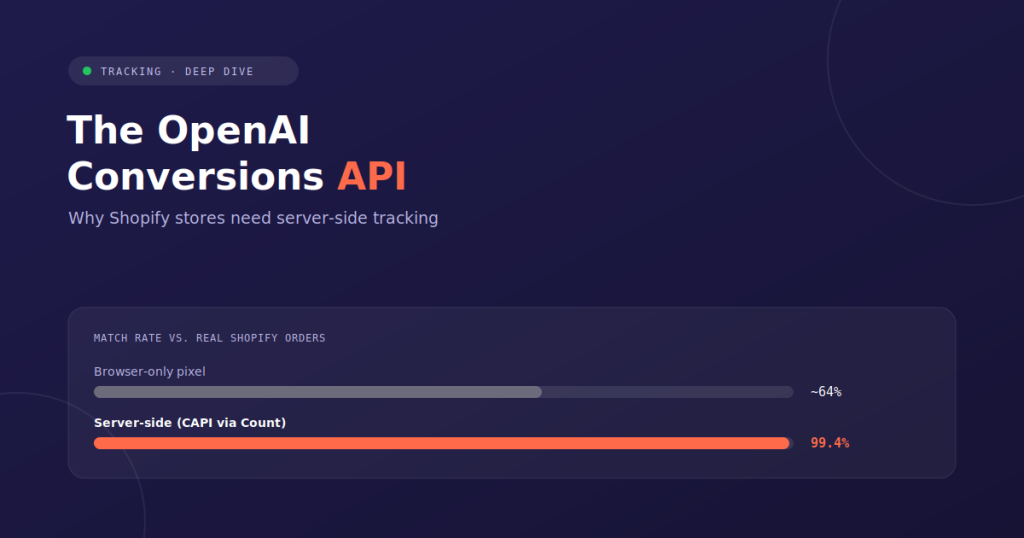
Add it up, and industry benchmarks consistently show browser-only pixels capturing somewhere around 60–65% of actual conversions — meaning roughly a third of your real sales never make it back to the ad platform at all.
That’s not just a reporting inconvenience. Ad platforms optimize on the data they receive, not the data that actually happened. If OpenAI Ads only sees two-thirds of your conversions, its algorithm is learning from a distorted picture of who actually buys from you — and it will keep scaling toward whatever audience does show up in that incomplete data, even if that’s the wrong audience.
What the OpenAI Conversions API Actually Is
The OpenAI Conversions API (CAPI) is a server-to-server connection that sends conversion events — page views, add-to-carts, purchases — directly from your Shopify store’s backend to OpenAI’s ad platform, bypassing the browser entirely.
Instead of relying on a script running in a shopper’s browser (which can be blocked, delayed, or expired), the event is sent from Shopify’s own servers the moment it happens. No cookie, no ad blocker, and no browser privacy setting sits between the sale and the platform that needs to know about it.
This is the same architectural shift that Meta’s Conversions API and Google’s Enhanced Conversions already made for their own platforms — OpenAI Ads is simply the newest channel to require it, and because the ecosystem around it is younger, fewer merchants have it configured correctly yet.
Browser Pixel vs. Server-Side (CAPI): Side by Side
| Browser Pixel Only | Server-Side (CAPI) | |
| Where the event fires | User’s browser | Shopify’s server |
| Blocked by ad blockers | Yes | No |
| Affected by iOS privacy limits | Yes | No |
| Survives checkout redirects | Often lost | Captured |
| Typical match rate vs. real orders | ~60–65% | 99%+ |
| Delay to platform | Immediate (if it fires) | Typically under 60 seconds |
| Algorithm sees | Partial, biased sample | Full, accurate order data |
Shared Event IDs and Deduplication: The Part Everyone Gets Wrong
Here’s where a lot of DIY CAPI setups go sideways. If you run both a browser pixel and a server-side connection at once — which many merchants do, intentionally or by accident — you now have two separate systems capable of reporting the same purchase. Without deduplication, that single sale gets counted twice, inflating your reported conversions and quietly corrupting your ROAS numbers in the opposite direction of the original problem.
The fix is a shared event ID: a unique identifier generated once per conversion event and attached to both the browser-side and server-side copies of that event, if both exist. When OpenAI’s system receives two events carrying the same ID, it recognizes them as duplicates and counts the conversion once — taking whichever signal arrived with more complete data.
Getting this right requires:
- Generating a consistent, unique event ID at the moment of purchase (usually the Shopify order ID or a derived hash).
- Passing that same ID through both the browser pixel call (if one exists) and the server-side API call.
- Timing the events correctly, since deduplication windows are typically short.
This is genuinely fiddly to build correctly by hand, and it’s the step most manual implementations skip entirely — which either double-counts conversions or, if a merchant disables the browser pixel to avoid duplicates, throws away a signal that could have filled in gaps the server-side event missed.
What This Means for Shopify Specifically
Shopify introduces a few extra wrinkles that make server-side tracking more important than on a fully custom storefront:
Checkout redirects. Shopify’s checkout flow, especially with Shop Pay, involves domain transitions that can break browser-based tracking mid-funnel. A server-side connection sourced from Shopify’s own order data sidesteps this entirely, since it doesn’t depend on the browser surviving the redirect.
Order value accuracy. Server-side events pull directly from the confirmed order object — including discounts, taxes, and currency — rather than estimating value from a client-side cart snapshot that may not match what was actually charged.
No developer required, if you use the right app. Manually building a CAPI integration means writing and maintaining backend code that listens for Shopify webhooks, formats events to OpenAI’s schema, handles authentication, and manages deduplication — ongoing engineering work most Shopify merchants don’t have the bandwidth for.
The Easy Button: How Count Handles This for You
This is exactly the gap Count was built to close. Instead of building and maintaining a custom CAPI integration, Count installs directly from the Shopify App Store and handles the entire server-side connection automatically:
- One-click install — no developer, no theme code, no webhook configuration to manage yourself.
- Automatic event ID generation and deduplication — page views, add-to-carts, and purchases are sent with proper shared event IDs, so nothing gets double-counted.
- Verified 99%+ match rate against your real Shopify order data, checkable directly in your Count dashboard.
- Sub-60-second delivery from checkout to a recorded event in OpenAI Ads.
- Zero code — the entire setup is App Store install, paste your pixel ID, done.
If you’re running (or planning to run) OpenAI Ads on Shopify, this is the single highest-leverage fix available before you spend another dollar on the platform. An accurate data feed doesn’t just improve your reporting — it changes what the algorithm actually learns to optimize toward.
Don’t want to set this up yourself? Our team can handle the full OpenAI Ads setup and management for you.
Frequently Asked Questions
Is the OpenAI Conversions API the same as a browser pixel? No. A browser pixel fires from the shopper’s device and can be blocked or lost to privacy restrictions. CAPI sends the same event from your store’s server, independent of the browser entirely.
Do I need both a browser pixel and CAPI? Not necessarily. Many merchants run CAPI alone once it’s properly configured, since it captures a more complete and accurate signal on its own. If you do run both, they must share event IDs so the same conversion isn’t counted twice.
How much of a difference does server-side tracking actually make? Industry benchmarks put browser-only pixel match rates around 60–65% of real conversions, versus 99%+ for a properly configured server-side connection — meaning a third of your actual sales may currently be invisible to the algorithm.
Do I need a developer to set up CAPI on Shopify? Only if you’re building it manually. Apps like Count handle the entire server-side connection, including event ID generation and deduplication, through a one-click Shopify install.
How fast does a server-side conversion show up in OpenAI Ads? With a properly configured connection, typically under 60 seconds from checkout completion to a recorded event in the ad platform.