Here is a number that should bother you more than it probably does: on a healthy ecommerce store running a standard browser pixel, your system never records roughly one in three conversions. Not delayed. Not attributed to the wrong channel. Simply gone — a real sale, real money in your bank account, that your ad platform never hears about.
You don’t feel this as a crisis because it doesn’t look like one. There’s no error message. Nothing turns red. Your dashboard shows numbers, the numbers look plausible, and you make decisions on them every single day. That is exactly what makes browser-pixel undercounting the most expensive problem most merchants never diagnose. Your ROAS looks worse than it is, your best campaigns look mediocre, and the algorithm optimizing your spend works against a picture of reality with a third of the pixels missing.
This post covers why that happens — the specific, mechanical reasons a browser pixel drops conversions — and the one architectural change that fixes it.
What a Browser Pixel Actually Is (and Why That’s the Problem)
A browser pixel is a piece of JavaScript that runs inside your shopper’s browser. When someone views a product, adds to cart, or completes a purchase, the pixel should fire — execute, package up the event, and send it to your ad platform.
The entire model rests on one fragile assumption: that the code will run, in the shopper’s browser, at the exact moment the event happens, and successfully reach an external server.
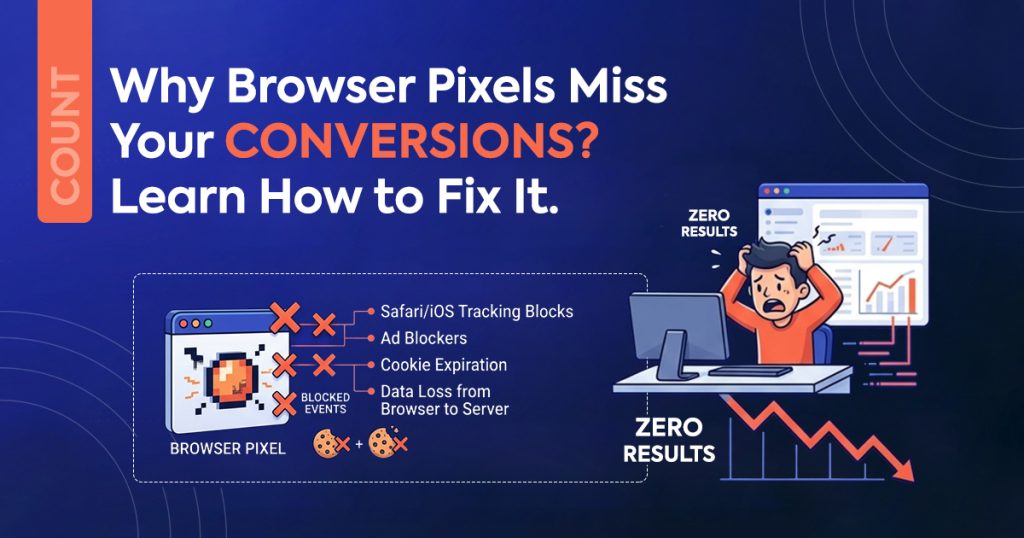
Every link in that chain now faces attack. The browser no longer acts as a neutral pipe that faithfully delivers your events. In 2026 it behaves as an actively hostile environment for third-party tracking — by design, by regulation, and by the choices of the people who make browsers and the people who use them. Conversion tracking accuracy collapses not because your setup broke, but because the ground underneath the browser pixel model shifted.
Here are the four holes, in order of how much damage they do.
iOS Intelligent Tracking Prevention (ITP)
Apple’s Intelligent Tracking Prevention is the single biggest reason your purchase events go missing, and it grows stricter with every Safari release.
ITP caps the lifetime of client-side cookies — in many cases to seven days, or as little as 24 hours for cookies that certain flows create. Here’s why that quietly destroys ecommerce attribution: a shopper clicks your ad on Monday, browses, leaves, and comes back to buy on the following Thursday. The cookie that tied that purchase back to the ad click has already expired. The sale happens. The attribution doesn’t.
It gets worse at the moment of purchase. Shopify checkout — and especially accelerated checkouts like Shop Pay — frequently redirects to a different domain to process payment. ITP deliberately severs exactly these cross-domain redirects. So the highest-value event you have, the purchase, fires at the exact moment the browser is most likely to have lost the thread.
And this isn’t a fringe audience. On most DTC stores, iOS makes up the majority of mobile traffic. ITP isn’t shaving a rounding error off your data — it’s eating your best customers’ purchases.
Ad Blockers and Tracking Protection
Somewhere between a quarter and a third of internet users now run an ad blocker or a browser with tracking protection switched on by default. Brave blocks trackers out of the box. Firefox turns Enhanced Tracking Protection on by default. Safari runs its own. Every major ad-blocking extension ships with filter lists that name conversion pixels explicitly.
When one of these runs, your browser pixel doesn’t fire slowly or partially. It doesn’t fire at all. The blocker intercepts the request before it ever leaves the device. That customer buys, gets their confirmation email, becomes a repeat purchaser — and to your ad platform, they never existed.
The cruel irony: the people most likely to run ad blockers skew younger, more tech-literate, and higher-income — frequently your most valuable segment. Browser-pixel undercounting isn’t random noise you can average out. It skews against exactly the buyers you most want the algorithm to find more of.
The Cross-Device Gap
People don’t shop in a straight line on one device anymore. They discover on their phone during a commute, research on a laptop at work, and buy on a tablet on the couch. A browser pixel sees three disconnected sessions on three different devices, with no thread linking them.
The ad that started the journey fired an event on device one. The purchase fired on device three. A browser pixel has no mechanism to know those are the same human. So the click earns no credit, your platform attributes the purchase to “direct” or “organic,” and your paid channels look weaker than they are. Every cross-device purchase is a conversion your browser pixel tracking structurally cannot connect.
The Closed Tab, the Slow Network, the Race Condition
Even when nothing actively blocks you, the browser stays unreliable. The purchase pixel should fire on the thank-you page. But:
- The shopper closes the tab the instant payment confirms, before the page fully loads.
- Their connection drops on a train, in a lift, in a dead zone.
- The pixel script loses a race against the page unload and never executes.
- A subscription or upsell app intercepts the confirmation flow, and the pixel never gets its moment.
None of these are edge cases. At scale they levy a steady, silent tax on every campaign you run — and they hit the purchase event hardest, because the purchase happens last, when the shopper is most likely to have already moved on.
What This Costs You (in Decisions, Not Just Data)
Undercounting isn’t a reporting inconvenience. It corrupts your decisions, and it compounds three ways.
Your ROAS reads low, so you underspend
If you capture ~64% of sales, your reported return runs ~36% too pessimistic on every campaign. Winners look like break-evens. You pause things that were quietly printing money.
The algorithm optimizes toward the wrong people
Modern ad platforms — Meta, Google, and now OpenAI Ads — are machine-learning systems that learn from the conversions you report. Feed them a biased 64% and they’ll faithfully find more people like the 64% who happened to be trackable, not more people like your actual best buyers. The blind spot doesn’t just hide performance; it actively teaches the machine the wrong lesson.
Your channels fight over phantom credit
Cross-device and expired-cookie gaps push real paid conversions into “direct” and “organic,” so you systematically under-credit the paid channels that actually drive growth, and over-invest in the ones that merely catch the last click.
You cannot fix a decision problem with a better dashboard. You have to fix the data underneath it.
The Fix: Move the Event Off the Browser
The whole category of failure above shares one root cause — the event depends on the browser. Remove that dependency and every one of these holes closes at once.
That’s what a server-side pixel does. Instead of relying on JavaScript running in a shopper’s browser, a server-side setup confirms the conversion from your store’s server. When Shopify records an order, the order webhook fires — from Shopify’s infrastructure directly to the ad platform’s Conversions API. No browser in the loop.
Walk it back through the four holes:
- ITP? Irrelevant. No client-side cookie expires, no cross-domain redirect breaks. The order exists on Shopify’s server; the server reports it.
- Ad blockers? Can’t touch it. A blocker lives in the browser and can only stop what the browser sends. A server-to-server call never goes near the browser.
- Cross-device? The order record itself confirms the purchase, tied to the actual transaction, not stitched together from device-bound sessions.
- Closed tabs and dead zones? The webhook fires when Shopify records the order — whether or not the shopper’s browser stays open, connected, or even switched on.
Serious advertisers have run this same architecture on Meta and Google for years through their Conversions APIs. It isn’t exotic. It’s the standard the browser-pixel model quietly stopped being able to meet.
The One Thing You Must Get Right: Deduplication
Keep the browser pixel and add server-side delivery — that combination is ideal, because the browser still catches on-site events like product views the server never sees. But now both tracks can report the same purchase. Without a shared identifier, the platform counts that sale twice, and you’ve traded undercounting for overcounting. The fix: an event_id built from the stable Shopify order ID, which you send identically on both tracks, so the platform recognizes and merges the duplicate.
How Count Closes the Gap
Count is a Shopify app that installs your ad pixel server-side in one click — no theme edits, no code, no developer.
Here’s what it does about each problem on this page:
- Server-side delivery via Shopify webhooks. Shopify’s servers confirm purchases, not fragile browser scripts — so ITP, ad blockers, and closed tabs stop mattering. The measured result: a 99.4% conversion match rate against actual Shopify orders, versus roughly 64% browser-only.
- Automatic deduplication. Count matches browser and server events by order ID, so it reports each conversion exactly once. You get the completeness of server-side without the double-counting trap.
- Exact order values. Count reports revenue, currency, discounts, and refunds precisely — so your ROAS reflects reality instead of a browser’s best guess.
- Consent-aware by default. It reads Shopify’s Customer Privacy API and only sends events for shoppers who consented under your region’s rules. Closing the accuracy gap doesn’t mean opening a compliance one.
- A real-time event log so you can watch page views, add-to-carts, and purchases stream in — and verify the gap closed instead of taking it on faith.
- Under 60 seconds from checkout to the event landing in your ad platform, with 100% checkout coverage including Shop Pay and redirect flows.
Setup takes under two minutes, and a free plan covers you — no paywall hides the full server-side pixel. Accuracy is the product, not the upsell.
Install Count on Shopify — free →
The Honest Bottom Line
Browser pixels don’t fail because you set them up wrong. They fail because the browser stopped being a reliable place to measure conversions — and the trend runs one direction only. ITP gets stricter, ad blockers get more common, privacy defaults get tighter. Every quarter, the browser-only merchant loses a little more of their own data.
You can keep making decisions on 64% of your sales, or you can move the event where nothing can block it. The gap is real, it’s measurable, and you can fix it in the time it takes to read this sentence twice.
If you run — or plan to run — OpenAI Ads on Shopify, this isn’t optional. A brand-new channel with a thin auction is the worst place to fly on incomplete data: it’s how you kill a winner before it proves itself, or fund a loser long after you should’ve cut it. Fix the measurement first. Everything downstream depends on it.
Frequently Asked Questions
Q1: How many conversions do browser pixels actually miss?
On a typical Shopify store, a browser-only pixel captures roughly 64% of actual sales — meaning about a third go unrecorded. The exact figure depends on your traffic mix (more iOS and more ad-blocker users means a bigger gap), but undercounting of 30% or more is common and largely invisible, because nothing in your dashboard flags the missing events.
Q2: Why does iOS specifically hurt conversion tracking accuracy?
Apple’s Intelligent Tracking Prevention (ITP) limits how long client-side cookies survive — often to seven days or less — and severs the cross-domain redirects that Shopify checkout and Shop Pay rely on. A shopper who clicks today and buys next week, or whom a payment domain redirects mid-checkout, frequently loses the cookie that ties the purchase to the ad. Since iOS makes up the majority of mobile traffic on most DTC stores, this alone accounts for a large share of the gap.
Q3: What is a server side pixel, and how is it different?
A server-side pixel confirms conversions from your store’s server instead of the shopper’s browser. When Shopify records an order, a webhook sends the purchase event directly to the ad platform’s Conversions API — no browser, no client-side cookie, nothing an ad blocker or ITP can intercept. Serious advertisers already run this same architecture on Meta and Google.
Q4: If I switch to server-side, will my sales get double-counted?
Only if you run both tracks without deduplication. The best setup keeps the browser pixel (for on-site events) and adds server-side delivery (for reliable purchases), with a shared event_id built from the Shopify order ID so the platform merges the duplicate. Count handles this automatically by matching events on order ID, so it reports every sale exactly once.
Q5: Do I need Shopify Plus or a developer for server-side tracking?
No to both. Server-side delivery works on every Shopify plan because it rides on Shopify’s order webhook, not on restricted checkout scripts (which is exactly why browser approaches struggle on non-Plus plans). And with an app like Count, install takes one click — no theme edits, no code, no developer.
Q6: Does fixing the tracking gap create a privacy or consent problem?
Not if the tool handles it. Count reads Shopify’s Customer Privacy API and only sends events for shoppers who consented under your store’s settings and regional rules. Server-side doesn’t mean consent-blind — it means a properly built app respects the consent state deliberately, out of the box.