Your OpenAI Ads campaign is live. Clicks are coming in. But something feels off. Maybe your ROAS looks weaker than it should. Maybe your Shopify orders don’t match what your ad dashboard reports. Or maybe conversions just aren’t showing up at all.
If any of that sounds familiar, your tracking probably has a gap somewhere. And that gap costs more than a messy dashboard. It changes what the algorithm learns, what it optimizes toward, and ultimately whether a genuinely good campaign gets scaled or quietly killed.
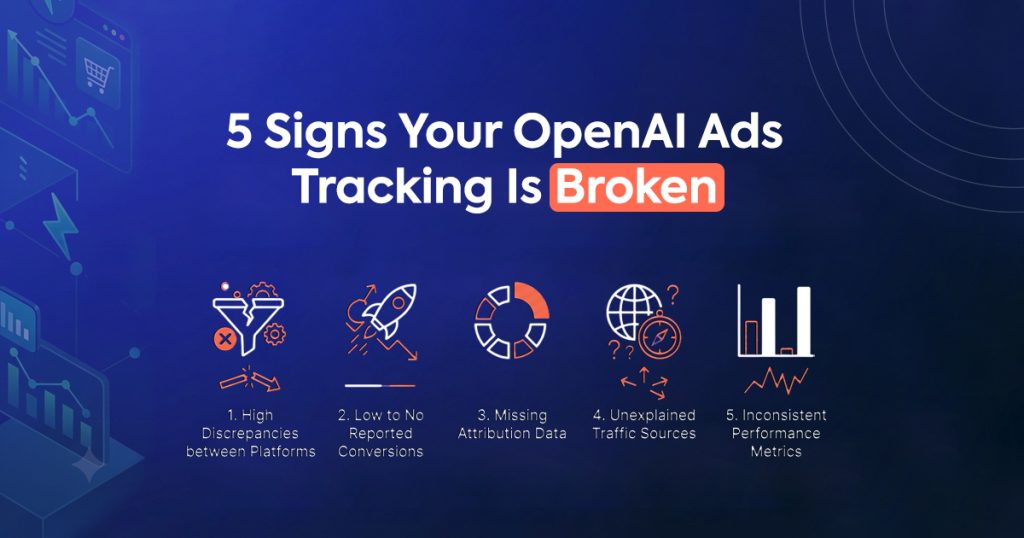
Here are five signs your OpenAI Ads tracking is broken. For each one, you’ll get the likely cause and the fix.
Your Ad Dashboard and Shopify Orders Don’t Match
This is the clearest red flag. It’s usually the first one merchants notice. You check your Shopify admin and see 40 orders for the day. Then you check your OpenAI Ads dashboard, and it shows only 22 conversions attributed to the campaign. The gap is too big to explain away as “some of those orders came from other channels.”
The cause: Most of the time, this comes down to a browser-only pixel. It relies on a script running in the shopper’s browser, and that script can get blocked, delayed, or lost entirely before it ever reports the sale. Industry benchmarks put browser-only match rates around 60–65% of real conversions. So a meaningful gap between your dashboard and your actual orders isn’t unusual — it’s expected.
The fix: Move to server-side tracking instead. A server-side connection sends the event straight from Shopify’s own servers the moment an order is confirmed, rather than depending on a browser script. There’s no cookie, no script, and no dependency on the shopper’s device. Match rates on a properly configured server-side setup typically land at 99%+ against your real order data.
Conversions Show Up Late, or Not at All
Sometimes the numbers eventually catch up, just slower than they should. A purchase happens, but it takes hours — or never appears — in your OpenAI Ads reporting. That delay makes same-day optimization nearly impossible, since you’re always working from stale or incomplete data.
The cause: This usually points to checkout redirects breaking the tracking chain. Shopify’s checkout, especially with Shop Pay, moves the shopper’s browser across different domains during the purchase flow. A browser pixel depends on staying on one continuous session, so it can lose track of the shopper right in the middle of that handoff. That means the most important event in the entire journey — the actual purchase — is the one most likely to get dropped.
The fix: A server-side connection doesn’t care about domain transitions, since it never reads anything from the shopper’s browser in the first place. Instead, it reads the confirmed order directly from Shopify’s backend once checkout completes, no matter how many redirects happened along the way. Once this is set up correctly, delivery to the ad platform should land in under 60 seconds.
Your ROAS Looks Worse Than It Should
Your gut tells you a campaign is working. Repeat customers mention seeing your ads. Your overall store revenue is up. But your reported OpenAI Ads ROAS still looks unprofitable, so now you’re stuck deciding whether to trust the number or your instincts.
The cause: This is what happens when Sign 1 goes unnoticed for a while. If your tracking only captures two-thirds of real conversions, your reported ROAS will look roughly a third worse than the truth — even though nothing about the campaign itself has changed. So a campaign that’s actually earning a healthy return can look like a loser, purely because of what your tracking failed to record.
The fix: Before you touch your bids, budgets, or creative, fix the tracking first. Compare your ad platform’s reported conversions against your actual Shopify order count over the same date range. If there’s a significant gap, that’s your answer: the campaign wasn’t underperforming. Your data was.
One Traffic Segment Converts Suspiciously Better Than Another
You notice desktop traffic converts great, but mobile looks weak. Or Safari users barely convert at all compared to Chrome users. On the surface, this can look like an audience or creative problem.
The cause: It’s rarely about the audience. Instead, it’s almost always about tracking coverage. Apple’s Intelligent Tracking Prevention (ITP) in Safari limits cookie lifespans and restricts cross-site data collection far more aggressively than other browsers. Since a large share of Shopify traffic is mobile, and a meaningful chunk of that is Safari, this single restriction can make an entire segment look artificially unprofitable — when really, it’s just under-tracked.
The fix: Server-side tracking sidesteps ITP entirely, since it never depends on a browser cookie surviving in the first place. Once it’s in place, re-check that same segment breakdown. In most cases, the “weak” segment turns out to be performing just fine. It was simply invisible before.
You’re Seeing Duplicate Conversions (Or Suspiciously Round Numbers)
Less common, but just as damaging: your reported conversions look too good. Numbers are inflated, sometimes obviously duplicated, showing more purchases than your store could possibly have generated.
The cause: This usually happens when a browser pixel and a server-side connection both run at once, without sharing event IDs. Both systems report the same purchase independently, and without a shared identifier to recognize them as duplicates, the platform counts the sale twice. That inflates your reported ROAS in the opposite direction from Sign 3 — which is arguably worse, since it can convince you to scale a campaign that isn’t actually performing as well as it looks.
The fix: Every event needs a shared unique event ID, whether it comes from the browser or the server. This is typically the Shopify order ID or a hash derived from it. When the platform receives two events with the same ID, it correctly recognizes them as duplicates and counts the conversion once. This is exactly the kind of detail that’s easy to miss in a manual setup, but easy to get right with a purpose-built tracking app like Count.
Quick Checklist: Diagnose Your Own Setup
Before assuming your tracking is fine, run through this in five minutes:
- Pull your OpenAI Ads conversion count and your Shopify order count for the same 7-day window. Do they roughly match?
- Check how long it takes for a test purchase to appear in your ad dashboard. Is it near-instant, or does it lag for hours?
- Compare ROAS across desktop vs. mobile, and Safari vs. Chrome. Is one segment suspiciously worse?
- Look for duplicate-looking numbers, or conversion counts that seem too high relative to your actual order volume.
- Confirm whether you’re running a browser pixel only, a server-side connection only, or both without shared event IDs.
If any of these raise a flag, the underlying issue is almost always the same. Your tracking isn’t sending complete, accurate, deduplicated data from your store to the ad platform.
The Common Thread
All five of these signs trace back to the same root cause: browser-based tracking alone isn’t reliable anymore. Ad blockers, iOS privacy restrictions, and checkout redirects all interfere with it in different ways. So the result is always some version of the same problem — incomplete or inaccurate conversion data feeding an algorithm that can only optimize on what it’s told.
The fix, in every case, is the same too. You need a server-side connection that sends verified events directly from Shopify’s servers, with proper deduplication if a browser pixel is also present. Count handles this with a one-click Shopify install, so you don’t need a developer or any code to get it right.
Want a Second Opinion on Your Setup?
Diagnosing tracking issues yourself is possible, but it takes time. It’s also easy to miss a subtle deduplication or delivery issue if you’re not looking for it specifically. Our team offers a free OpenAI Ads readiness audit that checks your pixel setup, verifies your match rate against real Shopify order data, and hands you a clear plan for anything that needs fixing before you spend another dollar on the platform.
Get a free tracking audit and find out exactly where your setup stands.
Frequently Asked Questions
How do I know if my OpenAI Ads tracking is actually broken? Compare your ad platform’s reported conversions against your real Shopify order count over the same date range. A gap of more than a few percentage points usually points to a tracking issue, rather than a genuine performance problem.
What’s the most common cause of broken OpenAI Ads tracking? A browser-only pixel. It depends on a script running in the shopper’s browser, and ad blockers, iOS privacy protections, and checkout redirects can all interfere with it. As a result, it typically captures only 60–65% of real conversions.
Can bad tracking make a good campaign look bad? Yes, and this is one of the most expensive mistakes in ecommerce advertising. A campaign that’s actually profitable can show a weak reported ROAS simply because a third of its real conversions were never recorded. That leads merchants to pause or cut budget from something that was actually working.
How do I fix duplicate or inflated conversion counts? Make sure every conversion event carries the same shared event ID, whether it’s sent from the browser or the server. This lets the ad platform recognize duplicate reports of the same purchase and count it only once.
What’s the fastest way to fix broken tracking on Shopify? Install a server-side tracking app that connects directly to Shopify’s backend, rather than relying on a browser script. This removes cookies, ad blockers, and checkout redirects from the equation entirely, and it typically restores match rates to 99%+ within minutes of setup.
Not sure where to start? Get a free OpenAI Ads tracking audit and see exactly what your current setup is missing.