Server-side tracking gets thrown around constantly in ecommerce advertising circles. It usually comes with acronyms like CAPI, event IDs, and match rates. So most merchants just nod along. But few ever get a straight answer to the real question: what does this mean for my store, and why should I care?
This guide skips the jargon. You don’t need code or an engineering background. Instead, you’ll get a plain-English explanation of what server-side tracking is, why it matters for every ad channel you run, how it actually works behind the scenes, and how Count sets it up for Shopify in one install.
By the end, you’ll understand exactly why your ad platform’s numbers might not match your Shopify orders — and what to do about it.
Start With the Problem It Solves
For most of the last decade, tracking a sale worked like this: a small script (a “pixel”) sits in your store’s theme. When someone completes checkout, that script quietly tells the ad platform, “this person converted.” It was simple, it required no backend work, and for a long time, it worked well enough.
Not anymore. Three things have quietly broken this model, and none of them are going away:
- Ad blockers stop the script from loading in the first place. If it never loads, you never see the sale reported — even though it happened. Ad blocker adoption has only grown over the past several years, and it’s especially common among exactly the kind of engaged, privacy-conscious shoppers many ecommerce brands most want to reach.
- iOS privacy protections, like Apple’s Intelligent Tracking Prevention, limit how long tracking cookies survive in Safari. They also restrict how much data these scripts can collect across different sites. Since a large share of Shopify traffic comes from mobile devices, this one restriction alone accounts for a meaningful chunk of missed conversions.
- Checkout redirects, especially with Shop Pay, can interrupt the browser session mid-purchase. When a shopper’s browser jumps between domains during checkout, the pixel can lose track of the session entirely — meaning the final, most important event of the entire customer journey (the actual purchase) is the one most likely to go unrecorded.
Industry benchmarks consistently show browser-only pixels capturing around 60–65% of real conversions. So roughly a third of your actual sales never make it back to whichever platform you’re advertising on. That’s not a small rounding error. That’s a third of your business, invisible to the very systems you’re paying to find more customers like them.
Here’s a simple way to picture the real-world impact. Imagine you run a $2,000 ad campaign, and it genuinely drives 28 purchases. If your browser pixel only reports 16 of them, your dashboard tells a much worse story than reality. Your reported ROAS looks weak, so you might pause the campaign or cut its budget — even though it was actually one of your best performers. Multiply that mistake across every campaign you run, every week, for months, and the compounding cost of bad tracking becomes one of the most expensive blind spots in ecommerce advertising today.
This isn’t just a cosmetic reporting gap, either. Ad platforms don’t optimize toward the conversions that actually happened — they optimize toward the conversions they can see. So if a platform only sees two-thirds of your real sales, its algorithm learns from a distorted, incomplete picture of who buys from you. As a result, it keeps spending toward whatever audience shows up in that partial data, even when that’s not your best audience. Over time, this can quietly steer your entire ad account toward the wrong customers, simply because the right customers weren’t being counted.
So What Is Server-Side Tracking, in Plain English?
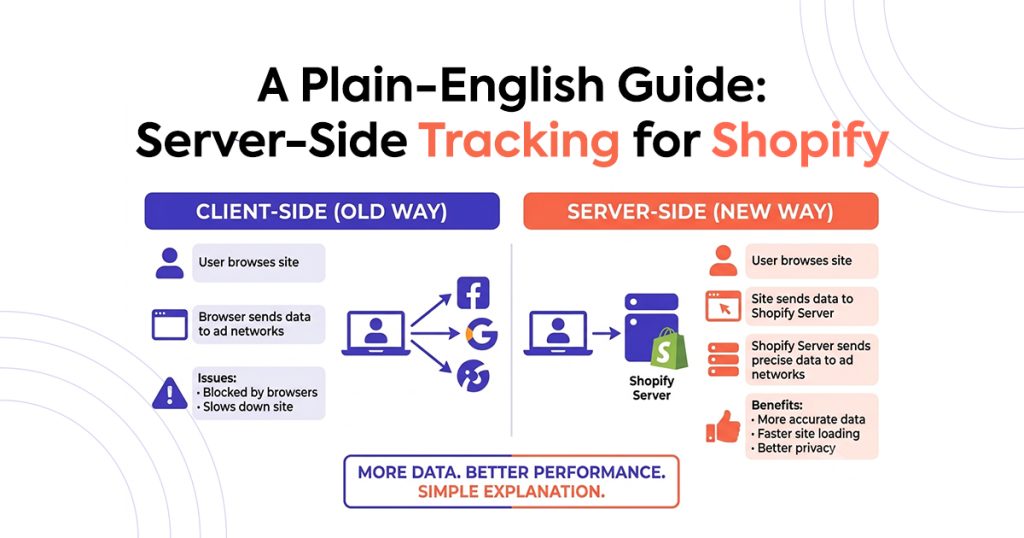
Picture this instead: rather than relying on a script inside a shopper’s browser — which can get blocked, delayed, or broken — server-side tracking sends the same information straight from Shopify’s own servers to the ad platform. That includes the purchase, the order value, and what the customer bought. None of it depends on the shopper’s browser cooperating, because the browser is no longer part of the equation at all.
Think of it this way. A browser pixel is like a customer whispering to you across a noisy room — easy to miss, easy to interrupt, and entirely dependent on the room staying quiet enough for you to hear. Server-side tracking is a direct phone call instead. It’s clear, reliable, and doesn’t care how noisy the room gets, because it never has to travel through that room at all.
The technical name for this connection is a Conversions API, often shortened to CAPI. Meta has one. Google has an equivalent called Enhanced Conversions. And OpenAI Ads has its own version too. The name changes slightly by platform, but the core idea stays the same everywhere: send the event from the server, not the browser.
Here’s what actually happens behind the scenes when a shopper checks out on Shopify with server-side tracking in place:
- The shopper completes checkout, and Shopify confirms the order on its own servers — this is the moment the sale becomes real and final, with accurate totals, discounts, and taxes already applied.
- That confirmed order triggers a webhook, a kind of automatic notification that Shopify sends out the instant something happens on your store.
- A server-side connection (like Count) picks up that webhook, formats the event correctly for whichever ad platform you’re using, attaches a unique event ID to prevent double-counting, and sends it along.
- The ad platform receives a clean, verified conversion event, usually within a minute of the original purchase.
Notice what’s missing from that entire process: a browser, a cookie, or anything that depends on the shopper’s device cooperating. There’s no script that can be blocked, no cookie that can expire, and no redirect that can interrupt the flow. That’s the entire point, and it’s why this approach is so much more reliable than anything browser-based tracking can offer.
Why It Matters for Every Ad Channel, Not Just One
This isn’t a fix for one single platform. Every channel you advertise on benefits from the exact same underlying shift, because every one of them faces the exact same underlying problem:
| Browser Pixel Only | Server-Side (CAPI) | |
|---|---|---|
| Where the event fires | Shopper’s browser | Shopify’s server |
| Blocked by ad blockers | Yes | No |
| Affected by iOS privacy limits | Yes | No |
| Survives checkout redirects | Often lost | Captured |
| Typical match rate vs. real orders | ~60–65% | 99%+ |
| Works across Meta, Google, OpenAI Ads | Inconsistently | Consistently |
The tracking foundation underneath every platform needs to be server-side first — otherwise, none of your reported performance data actually holds up. It doesn’t matter how good your creative is, how tight your targeting is, or how well you’ve optimized your landing pages. If the platform can’t see two-thirds of your real conversions, every decision built on top of that data — what to scale, what to pause, which audience to chase, which creative to declare a winner — starts from a distorted foundation. You can be doing everything else right and still lose, simply because the scoreboard is wrong.
This also explains why merchants sometimes see wildly different results running the “same” campaign on different platforms, or why a channel that worked great for one store seemingly flops for another with a nearly identical product. It’s rarely the platform itself, and it’s rarely the product either. More often, it’s a difference in how completely each setup is actually capturing conversions in the first place. A store with solid server-side tracking on Meta and a bare browser pixel on OpenAI Ads isn’t really comparing two ad platforms — it’s comparing a platform with full visibility to one that’s flying half-blind.
Why This Is Especially True on Shopify
A few things about how Shopify’s checkout actually works make server-side tracking even more important than it might be on a fully custom-built storefront, where a developer could theoretically account for every quirk manually.
Checkout redirects cause the first issue. Shop Pay and Shopify’s hosted checkout involve domain transitions — the shopper’s browser physically moves from your store’s domain to Shopify’s checkout domain and sometimes back again. These transitions can interrupt a browser-based pixel mid-purchase, right at the exact moment you most need it to fire correctly. A server-side event avoids this entirely, since it pulls straight from Shopify’s confirmed order data on the backend instead of depending on the shopper’s browser surviving that handoff.
Order value accuracy matters just as much, even if it gets less attention. Server-side events read the final, confirmed order — including any discounts, promo codes, and taxes actually applied at checkout. A browser pixel, by contrast, often estimates order value from an earlier cart snapshot that might not match what the customer was actually charged by the time they finished checking out. That difference sounds small in isolation, but it compounds fast once you’re running discount codes, regional tax rates, or currency conversion at any real scale — and it means your reported revenue numbers may simply be wrong, not just incomplete.
Code requirements round out the picture, and this is where most DIY attempts quietly stall out. Building this connection manually means writing backend code to listen for Shopify webhooks, formatting the data correctly for each individual ad platform’s API, and handling deduplication logic so a sale never gets counted twice if a browser pixel is also firing. That’s real, ongoing engineering work — not a one-time setup you build once and forget. Ad platforms update their APIs periodically, sometimes with little warning, and a hand-built integration needs someone actively watching for those changes and updating the code accordingly. Most Shopify merchants don’t have a developer sitting around dedicated to that kind of maintenance, and realistically, most shouldn’t need one just to track sales accurately.
What Happens If You Skip This
It’s worth being direct about the real cost of doing nothing. Merchants who stick with browser-only tracking usually don’t notice the problem right away — the dashboard still shows numbers, campaigns still “run,” reports still get generated, and nothing looks obviously broken on the surface. The damage shows up more subtly, buried inside decisions made on bad information rather than in any single dramatic failure:
- Campaigns that are actually profitable get paused or defunded, simply because their reported ROAS looks weak on an incomplete data set.
- Budget quietly gets shifted away from your best-performing audience, purely because that audience’s conversions weren’t fully captured by a leaky browser pixel.
- A/B tests produce misleading winners, since the variant with better browser-tracking coverage — maybe due to a different device mix or checkout path — can look like it’s outperforming a variant that’s actually converting just as well, or even better.
- New ad platforms, including OpenAI Ads, end up judged unfairly and abandoned early, since a channel that “didn’t work” may really just have been under-tracked from day one, never given a fair chance to prove itself on complete data.
- Forecasting and inventory planning drift off, since revenue projections built on undercounted sales data understate real demand, sometimes leading to stock shortages precisely when a channel is actually performing well.
None of these mistakes look like tracking problems from the outside. They look like ordinary advertising decisions, made with reasonable confidence, on numbers that were never quite right to begin with — which is exactly what makes this particular blind spot so persistent and so costly over time.
How Count Does This in One Install
This is exactly the gap Count closes for Shopify merchants who don’t want to write or maintain backend code themselves.
- One-click install from the Shopify App Store. No developer, no theme edits, no code to touch anywhere in your store.
- Server-side delivery of page views, add-to-carts, and purchases — sent directly from Shopify’s backend the moment they happen, with no dependency on the shopper’s browser.
- A verified match rate, typically 99%+, against your real Shopify order data. You can check this directly in your Count dashboard at any time, rather than taking it on faith.
- Sub-60-second delivery from checkout completion to a recorded event on the ad platform, so your reporting stays close to real time.
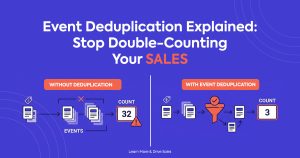
- Automatic deduplication. So if you’re also running a browser pixel alongside the server-side connection, nothing gets counted twice, and your numbers stay accurate rather than inflated.
Just connect your store, paste your pixel ID, and verified server-side events start flowing right away. There’s no code to write, no webhook to configure by hand, and no ongoing maintenance to worry about when an ad platform updates its API — Count keeps that connection current on your behalf, quietly, in the background, so you can focus on running campaigns instead of babysitting tracking infrastructure.
Not sure which package fits your store, or want our team to set this up and manage the whole thing for you end to end? Take a look at our services and pricing.
Frequently Asked Questions
Do I need to understand code to set up server-side tracking? No. That’s the entire point of an app like Count. It handles the backend connection through a one-click Shopify install, so you never need a developer or any code, regardless of your technical background.
Is server-side tracking only useful for OpenAI Ads? Not at all. It benefits every ad platform you run, including Meta and Google, since both have their own server-side tracking equivalents already built into their ecosystems. The same underlying fix — send the event from the server, not the browser — applies across all of them equally.
How much better is server-side tracking, really? Browser-only pixels typically capture around 60–65% of real conversions. A properly configured server-side connection, on the other hand, typically captures 99%+. That gap means roughly a third of your actual sales could currently be invisible to your ad platform’s algorithm, distorting everything from reported ROAS to audience targeting.
Do I need to remove my existing pixel to add server-side tracking? Not necessarily. Many merchants run both together side by side, but they need to share event IDs so the same sale isn’t double-counted across both systems. Some eventually switch to server-side tracking alone, once they’ve confirmed it captures everything reliably on its own.
How long does setup actually take? With Count, setup means a one-click Shopify App Store install, followed by pasting your pixel ID. Most merchants see verified, server-side events flowing within minutes of finishing that short process.
Will switching to server-side tracking change my numbers overnight? Yes, usually for the better, and often noticeably so. Most merchants see their reported conversions and revenue rise once server-side tracking is verified and running, simply because the platform starts seeing sales it was missing all along. That’s not new revenue appearing from nowhere — it’s revenue you were always generating, finally showing up where it belongs, in the dashboard where you make real decisions.
Does this work if I’m testing a brand-new ad channel like OpenAI Ads? Yes, and arguably it matters even more there. A brand-new channel with no track record is exactly the situation where you can least afford bad data — you’re trying to decide whether the channel deserves real investment, and an incomplete tracking setup can make a genuinely good channel look like a failure before it ever gets a fair test.