The Real Reason Your Ad Algorithm Targets the Wrong People

You’ve done everything the playbook told you to. You wrote sharper creative. You tightened your audiences. You raised bids on the winners and cut the losers. And still, month after month, the algorithm spends your budget on people who don’t buy — window shoppers, one-click bouncers, the endlessly-adds-to-cart-never-checks-out crowd.

The reflex is to blame the targeting settings. Test a new lookalike. Narrow the interests. Try broad. Try manual. You tinker with the dials on the dashboard because it’s what you can see.

But the dials aren’t the problem. Ad algorithm targeting is downstream of something you probably haven’t looked at in months: the quality of the conversion data you feed it. Modern platforms don’t target based on your settings so much as they target based on your signals — and if those signals are incomplete, no amount of dial-turning will save you. Garbage in, wrong people out.

This post explains the actual mechanism — how flawed conversion data misdirects the algorithm on every platform, why the failure stays invisible on your dashboard, and why fixing your measurement foundation beats every targeting tweak you could make.

How Ad Algorithms Actually Decide Who to Target

Start with a correction, because the whole industry talks about targeting wrong.

When you set up a campaign, you feel like you’re choosing the audience. In reality, on Meta, Google, TikTok, and now OpenAI Ads, you’re choosing a starting constraint — and then the machine-learning system takes over. It watches who converts, builds a statistical profile of those people, and spends the rest of your budget finding more of them.

The feedback loop is the product

Every ad platform runs the same core loop:

  1. It shows your ad to a batch of people.
  2. Some of them convert.
  3. It reports those conversions back into the system.
  4. The model studies the converters and adjusts who it shows the ad to next.
  5. Repeat, thousands of times a day.

That loop is the entire engine. Your creative and your bids influence it, but the fuel is the conversion signal — the data that tells the model which impressions turned into sales. The model only ever gets as smart as the definition of “converter” you hand it.

Which means your data is your targeting

Here’s the uncomfortable conclusion. If your conversion signal is complete and accurate, the model learns from a true picture of your buyers and gets better every day. If your signal is partial or biased, the model learns from a distorted picture — and gets confidently worse, because it has no way to know the picture is distorted. It optimizes hard toward a version of your customer that doesn’t fully exist.

Ad algorithm targeting isn’t a settings problem. It’s a data problem wearing a settings costume.

The Hidden Flaw: Your Conversion Signal Carries Bias, Not Just Gaps

Most merchants who learn their pixel misses conversions assume the damage is a smaller number. Fewer conversions reported, lower ROAS, done. That framing badly understates it.

The real damage isn’t that you lose some data. It’s that you lose data in a non-random way. If you haven’t already read the full breakdown, we covered why browser pixels lose your best customers in detail — but here’s the short version.

Missing conversions cluster on a specific type of buyer

Think about who your browser pixel fails to record. It misses:

  • iOS users, because Apple’s Intelligent Tracking Prevention expires the cookies that tie their purchase to the click.
  • Ad-blocker users, because the pixel request never leaves their device.
  • Cross-device shoppers, because the browser can’t connect the phone that clicked to the laptop that bought.
  • Privacy-conscious buyers generally, because every browser default now leans their way.

Notice what those groups have in common. They skew younger, more affluent, more tech-literate, more mobile-first — frequently the highest-value segment of your entire customer base. The conversions you lose aren’t a random 30% sample. They’re a specific 30%, packed among the exact people you’d most want more of.

So the model learns the wrong lesson

Now run that through the feedback loop. The algorithm only sees the conversions that did land — the ones from older desktop users on Chrome with no ad blocker who bought on the first session. It concludes those people are your buyers. It goes and finds more of them. And it systematically avoids the mobile-first, privacy-protected, high-value segment, because as far as its data shows, those people never convert.

You didn’t just lose reporting accuracy. You taught your ad optimization engine to actively discriminate against your best customers. Every day it runs, it gets more precisely wrong.

Why This Stays Invisible on Your Dashboard

If this were happening, surely you’d see it? You wouldn’t, and the reasons deserve understanding.

The numbers look plausible

Nothing turns red. A biased dataset produces a perfectly normal-looking dashboard — real conversions, believable ROAS, a cost-per-acquisition in the range you expect. No error state exists for “the conversions I’m showing you are the wrong ones.”

The algorithm hides its own blind spot

The model can’t report a problem it can’t perceive. It doesn’t know it’s missing the iOS buyers, so it never flags them. From inside the system, everything looks like it’s working — the reported conversions convert, the model optimizes toward them successfully. The failure lives entirely in the gap between what happened and what the system recorded, and no dashboard can show you a gap.

The symptoms mimic other problems

When performance stalls, the missing-signal explanation never surfaces, because the symptoms look like more familiar villains. Rising CPA looks like auction competition. Plateauing scale looks like a saturated audience. Weak new campaigns look like creative fatigue. You chase those, because those are the stories the industry tells. The conversion data quality issue underneath never enters the conversation.

Why Better Targeting Settings Can’t Fix a Data Problem

This part saves you months of wasted effort, so sit with it.

Every targeting lever you can pull operates on top of the conversion signal, not underneath it.

A better audience still learns from bad data

Build a pristine lookalike, and the platform builds it from your converter list — which is your biased converter list. The lookalike faithfully resembles the wrong people. You’ve made the model more efficient at finding more of the segment you didn’t want to over-weight.

Broad targeting hands the algorithm more rope

“Go broad and let the algorithm figure it out” is sound advice — but only when the algorithm holds a true signal to figure things out with. Feed a broad campaign a biased signal, and it explores the whole audience, then narrows hard onto the trackable-buyer cluster, because that’s the only place it sees conversions. Broad targeting amplifies a good signal and amplifies a bad one just as efficiently.

Manual bidding can’t out-think missing data

You can bid up the segments you believe are valuable, but now you’re fighting your own conversion data by hand, permanently, on every campaign. That’s not a strategy. It’s a symptom you’ve decided to manage instead of cure.

The pattern holds across every lever: you cannot tune your way out of a foundation problem. The settings sit on top of the data. Fix the data, or keep decorating the crack.

Fix the Foundation: Feed the Algorithm a Complete Signal

There’s exactly one durable fix, and it’s structural rather than tactical. Give the model a conversion signal that captures every buyer, not just the trackable ones.

Move the money event off the browser

The conversions you lose all share one cause — they depend on the browser to report themselves, and the browser has become an unreliable narrator. A server-side setup removes that dependency. When Shopify records an order, the order webhook fires the conversion directly from Shopify’s infrastructure to the ad platform’s Conversions API. No browser, no expiring cookie, nothing for an ad blocker to intercept.

That single change closes the bias at its source. The iOS buyer, the ad-blocker user, the cross-device shopper — the server records them all identically, because it confirms the purchase from the order record rather than from a fragile script in their browser.

Don’t introduce a new problem while fixing the old one

A complete signal only helps if each sale counts once. The moment you run both a browser pixel and a server-side feed, you risk double-counting every conversion the browser does catch. We unpacked exactly how to stop double-counting before you scale spend in a separate walkthrough — the short answer is a shared event_id that you derive from the Shopify order ID and deliver on both tracks, so the platform deduplicates automatically.

What the algorithm does with a clean signal

Feed the model a complete, unbiased converter list and the feedback loop finally works in your favour. It sees your actual buyers — mobile-first and desktop, privacy-protected and not, first-session and cross-device. It builds lookalikes from the real population. It stops avoiding your high-value segment because it can finally see them convert. The same algorithm that was confidently wrong becomes confidently right, and every downstream lever — audiences, bids, budget — now operates on truth instead of a distortion.

You don’t get better targeting by tuning targeting. You get it by fixing what targeting learns from.

How Count Rebuilds Your Signal Foundation

Rebuild your conversion signal with Count — it installs your ad pixel server-side on Shopify in one click and hands the algorithm the complete picture it’s been missing.

What it does for your targeting

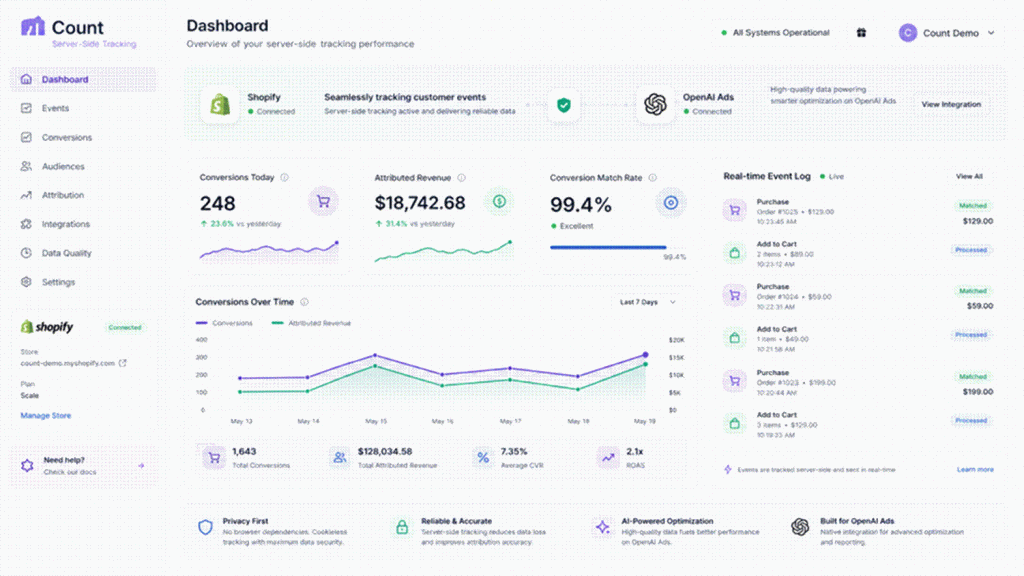
It captures the buyers your pixel loses. See how server-side delivery captures every buyer — Shopify’s servers confirm every purchase, so iOS, ad-blocker, and cross-device conversions all reach your ad platform. The measured result across live stores: a 99.4% conversion match rate against actual Shopify orders, versus roughly 64% browser-only. That recovered 35% falls disproportionately in your high-value segment — the exact data the model needs to stop mistargeting.

It deduplicates automatically. Count matches browser and server events by Shopify order ID, so a complete signal doesn’t become a double-counted one. The model gets each buyer once, accurately.

It sends exact values. Discounts, currency, and refunds land precisely, so the algorithm optimizes toward real revenue rather than a browser’s rough guess — which matters enormously for value-based bidding.

It respects consent. Count reads Shopify’s Customer Privacy API and only sends events for shoppers who consented, so you rebuild signal quality without opening a compliance gap.

It starts free. The full server-side pixel with deduplication ships on every plan, including the free tier. Accuracy isn’t the upsell — it’s the product.

Done-for-you, if you’d rather not run it yourself

Fixing the signal is step one. Rebuilding campaigns on top of clean data is step two, and it’s a different skill. The team behind Count doesn’t just ship the tracking — Count’s managed OpenAI Ads service covers setup, launch, and daily management on that same server-side foundation. The team handles creative, copy, bidding, and optimization so you don’t have to.

It starts with a free readiness audit: the team measures your real conversion gap before you spend another dollar, so you can see exactly how much of your targeting problem is really a data problem. Book a free readiness audit →

Install Count free on Shopify →

The Bottom Line

Your ad algorithm isn’t broken, and it isn’t stupid. It does precisely what you built it to do — learn from the conversions you report and find more people like them. The problem is that you’ve reported the wrong conversions, so it’s been finding the wrong people, flawlessly, for months.

No lookalike, bid strategy, or audience refinement fixes that, because all of them learn from the same distorted signal. The only durable move is to repair the foundation: capture every buyer, feed the model a true picture, and let a system that was confidently wrong become confidently right.

Fix the data first. Then, and only then, does the targeting take care of itself.

Frequently Asked Questions

Q1: Why does my ad algorithm keep targeting people who don’t convert?

Usually because your conversion signal carries bias, not because your settings are wrong. Ad platforms learn who to target from the conversions you report. If your pixel misses a specific slice of buyers — typically iOS, ad-blocker, and cross-device users — the algorithm never learns those people convert, so it chases the trackable segment instead and avoids some of your best customers.

Q2: How does conversion data quality affect ad targeting?

Directly and completely. Machine-learning ad platforms build their entire targeting model from your reported conversions. High-quality, complete data teaches the model an accurate picture of your buyers. Biased or partial data teaches it a distorted one — and because the model can’t perceive its own blind spot, it optimizes confidently toward the wrong audience.

Q3: Will a better lookalike audience fix my targeting problem?

Not if the underlying data carries bias. A lookalike mirrors your existing converter list, so if that list systematically excludes your high-value mobile and privacy-protected buyers, the lookalike resembles the wrong people. Better audiences sit on top of your conversion signal — they can’t repair it.

Q4: Why doesn’t my dashboard show that the algorithm is mistargeting?

Because a biased dataset produces a normal-looking dashboard. The conversions you do record are real, so ROAS and CPA look plausible. The failure lives in the gap between what happened and what the system recorded, and no dashboard displays a gap. The symptoms also mimic auction competition, audience saturation, and creative fatigue, so the real cause rarely surfaces.

Q5: How do I feed the algorithm a complete conversion signal?

Move the purchase event off the browser and onto the server. A server-side setup confirms each sale from Shopify’s order webhook rather than a browser script, so it captures the iOS, ad-blocker, and cross-device buyers that browser pixels lose. That gives the algorithm an unbiased converter list to learn from. An app like Count installs this in one click on Shopify.

Q6: How long until targeting improves after I fix my tracking?

Expect the model to re-learn over its optimization window — often one to two weeks of steady conversion volume — as the newly captured buyers enter the feedback loop. The improvement compounds: each cycle, the model sees more of your true audience and refines toward it, rather than toward the trackable-only slice it relied on before.
Event Deduplication Explained: Stop Double-Counting Your Sales


Every merchant who fixes their tracking gap eventually creates a second, quieter problem.

You read about browser pixels missing a third of your conversions. You add server-side delivery. The purchases finally start landing. And then, a few weeks later, you notice something odd: your ad platform reports 340 sales for the month. Shopify reports 178. Your ROAS looks incredible. Your accountant disagrees.

You didn’t fix undercounting. You traded it for overcounting — and overcounting is arguably worse, because it feels like winning.

The mechanism behind this is event deduplication, and it is the single most misunderstood piece of modern conversion tracking. This post explains what deduplication actually does, why running two tracking methods demands it, exactly how platforms decide two events are the same event, and how to verify that yours works before you scale spend against numbers that describe nothing.

Why You End Up With Two Events for One Sale

Start with why anyone runs two tracking methods at all.

A browser pixel sees things the server never will. It watches a shopper scroll a product page, filter a collection, hover a size chart, abandon a cart. Those on-site behavioural signals matter for optimization, and only the browser can capture them.

A server-side pixel sees the one thing the browser routinely loses: the confirmed purchase. Shopify’s order webhook fires from Shopify’s own infrastructure, so ad blockers, iOS ITP, closed tabs, and Shop Pay redirects can’t touch it.

So the correct architecture keeps both. The browser handles the rich mid-funnel signals; the server guarantees the money event. Nearly every serious advertiser on Meta and Google has run this dual setup for years.

The collision

Here’s the collision nobody warns you about. A shopper completes checkout on a device with no ad blocker and a stable connection. The browser pixel fires a purchase event. Moments later, Shopify’s webhook fires a purchase event for the same order. Two events. One sale.

Your ad platform now has a decision to make, and without help, it makes the wrong one: it counts two conversions. Multiply that across every shopper whose browser did successfully fire, and your reported conversion volume inflates by 60 to 70 percent — because that’s roughly the share of traffic where both tracks succeed.

What Event Deduplication Actually Is

Event deduplication is the process an ad platform uses to recognize that two incoming events describe the same real-world action, and to count that action only once.

The platform doesn’t guess. It doesn’t compare timestamps and hope. It looks for a shared identifier that you attach to both events — and if the identifiers match, it keeps one and discards the other.

That identifier carries different names on different platforms:

PlatformDeduplication keyNotes
Meta (Facebook)event_id + event_nameBoth must match; 48-hour dedup window
Google Adstransaction_id / order_idEnhanced conversions match on order
OpenAI Adsevent_idConversions API accepts a client-supplied ID
TikTokevent_idPaired with event name

The naming varies. The principle never does: you supply the key, on both tracks, identically. No shared key, no deduplication. The platform simply has no way to know the two events belong together.

The window matters too.

Deduplication is not permanent. Platforms only compare incoming events against a recent buffer — Meta’s window runs 48 hours, and most others land in a similar range. If your server event arrives four days after the browser event, no dedup happens, and the sale counts twice regardless of how perfect your event_id is.

In practice this rarely bites you, because Shopify’s webhook fires within seconds. But it does explain a specific failure mode: if you batch server-side uploads nightly or weekly instead of streaming them in real time, your deduplication quietly stops working.

What Makes a Good Deduplication Key

This is where most self-built implementations go wrong, so it deserves precision.

A deduplication key must be three things at once.

Unique

One key per real-world conversion. If two different orders can produce the same key, the platform discards a genuine second sale, and now you’re undercounting again — the exact problem you set out to fix.

Stable

Both tracks must derive the same key independently, at different moments, on different infrastructure. The browser generates its event at checkout completion. The server generates its event when Shopify records the order. Neither one can see what the other produced. So the key has to come from a value both sides can read from the same source of truth.

Deterministic

No randomness. No timestamps. No session IDs.

That last point kills a surprising number of DIY setups. A developer generates a random UUID in the browser, sends it with the browser event, and then generates another random UUID on the server. Both events look valid. Neither shares an ID. Every sale counts twice, and the dashboard gives no warning at all.

The right answer on Shopify

Use the Shopify order ID.

It’s unique by definition; it’s stable the instant Shopify creates the order, both the browser context and the webhook payload can read it, and it involves no randomness whatsoever. Prefix it if you like namespacing — order_5821094 — but keep the transformation identical on both sides. Even a trailing space breaks the match.

Avoid these as keys:

  • Timestamps. Browser and server clocks differ by milliseconds, which is enough to fail an exact-match comparison.
  • Session or cookie IDs. The server has no reliable access to them, which is the entire reason you went server-side.
  • Customer email. A repeat customer’s second order collapses into their first.
  • Cart token. It sometimes changes between checkout and order creation.

How to Tell If You’re Double-Counting Right Now

You don’t need special tooling for the first check. You need Shopify and a calculator.

The 60-second audit

Pick a completed week. Note the number of orders in your Shopify admin. Note the number of purchase conversions your ad platform reports for the same window, matched on the same attribution basis.

Read the ratio:

  • Platform ≈ Shopify: deduplication works. Move on.
  • Platform ≈ 1.5× to 1.7× Shopify: classic double-counting. Both tracks fire, no shared key.
  • Platform ≈ 2× Shopify: every event duplicates — usually a manually pasted theme snippet running alongside an app.
  • Platform ≈ 0.6× to 0.7× Shopify: you’re browser-only, and undercounting rather than double-counting.

That single ratio diagnoses more tracking problems than any dashboard.

Three symptoms that give it away

Your ROAS looks too good. Trust this instinct. A channel that suddenly doubles its return without any change in creative, bid, or audience didn’t get better — your measurement got worse.

Your platform AOV drops. Platforms divide total revenue by conversion count. Double the conversions, halve the reported AOV. If your ad platform thinks your average order is $34 while Shopify says $68, you’ve found your answer.

Your cost per acquisition looks impossible. Spend stays flat, conversions double, CPA halves. Nothing real happened.

Why Double-Counting Costs More Than Undercounting

Both distortions mislead you. Double-counting misleads you in the more expensive direction.

It teaches the algorithm nonsense.

Ad platforms optimize toward the conversions you report. Duplicate events don’t distribute evenly across your audience — they cluster on shoppers whose browsers don’t block tracking. So the algorithm sees that segment convert at twice the rate of everyone else, and it chases them harder. You end up paying a premium to reach the narrowest, most trackable slice of your market while the model actively discounts buyers it should pursue.

Undercounting hides opportunity. Double-counting manufactures a false one and then funds it.

It survives scrutiny longer.

An undercounting merchant sees disappointing ROAS, gets suspicious, and investigates. A double-counting merchant sees excellent ROAS and celebrates. Nobody audits good news. That’s why these setups run for months, and why the discovery usually arrives through a P&L that refuses to match the ad dashboard.

It compounds at scale.

Bad data hurts most where you commit most. Merchants scale into what looks like their best-performing campaign, and the inflation scales right alongside the spend — until real revenue and reported revenue diverge far enough that someone finally checks.

How Count Handles Event Deduplication Automatically

Count installs your ad pixel server-side on Shopify in one click, and it solves this problem by construction rather than configuration.

It derives the key from the Shopify order ID. Both the browser event and the server event carry the same event_id, built the same way from the same authoritative value. You don’t generate anything, match anything, or configure anything.

It streams in real time. The server event reaches your ad platform in under 60 seconds, comfortably inside every platform’s dedup window. No batching, no nightly upload that silently breaks the match.

It reports exact order values. Deduplication fixes the count; correct values fix the revenue. Count sends discounts, currency, and refunds precisely, so a deduplicated conversion also carries the right number attached to it.

It shows you the evidence. The real-time event log displays each event as it lands, with its delivery source and its ID. You can place a test order and watch the purchase appear exactly once — which is the difference between believing your tracking works and knowing it does.

The measured outcome across live stores: a 99.4% conversion match rate against actual Shopify orders. Not 64% from browser-only undercounting, and not 170% from unmanaged double-counting. Matched.

Setup takes under two minutes, and the free plan includes the full server-side pixel with deduplication. Accuracy isn’t the upsell — it’s the product.

Install Count on Shopify — free →

If You’d Rather Build It Yourself

Some teams will, and the path is clear enough to describe honestly.

Generate your event_id from the Shopify order ID and apply the identical transformation on both tracks. Fire the browser event through Shopify’s Web Pixels API rather than a theme snippet, so theme updates don’t silently break it. Fire the server event from the order webhook, in real time, never batched. Match event_name alongside event_id, because Meta requires both. Then audit the platform-to-Shopify ratio weekly for the first month.

The part that catches most teams isn’t the logic — it’s the drift. Someone installs a second pixel through an app, a theme migration duplicates a snippet, a subscription tool intercepts the order flow. Each of these reintroduces double-counting weeks after you verified everything worked. Owning the implementation means owning that surveillance permanently.

The Bottom Line

Event deduplication is not an optimization. It’s the condition under which your conversion data means anything at all.

Run one track, and you undercount. Run two without a shared key and you double-count. Run two with a deterministic event_id from your Shopify order ID, delivered in real time, and you get the completeness of server-side tracking with the accuracy of a single source of truth.

Do the 60-second audit today. Compare your ad platform’s conversion count to your Shopify order count for last week. If the ratio isn’t close to 1.0, you’ve been making decisions on a number that doesn’t exist — and now you know which direction it’s wrong in.

Then fix the measurement before you touch the campaigns. Everything downstream depends on it.

Frequently Asked Questions

Q1: What is event deduplication in conversion tracking?

Event deduplication is how an ad platform recognizes that two incoming events describe the same real conversion and counts it only once. When you run both a browser pixel and a server-side Conversions API, a single purchase can generate two events. Deduplication matches them on a shared identifier — usually an event_id — and keeps one.

Q2: How do I know if my pixel is double-counting sales?

Compare your ad platform’s reported conversions to your Shopify order count for the same week. A ratio near 1.0 means deduplication works. A ratio of roughly 1.5× to 2× means both tracks fire without a shared key. Two other tells: your reported AOV drops well below your true Shopify AOV, and your ROAS improves sharply without any change to creative or bidding.

Q3: What should I use as my event_id on Shopify?

Use the Shopify order ID. It’s unique per conversion, stable the moment Shopify creates the order, readable by both the browser context and the webhook payload, and completely deterministic. Avoid timestamps, random UUIDs, session IDs, cart tokens, and customer email — none of them produce a reliable match across both tracks.

Q4: Does the Conversions API deduplicate automatically?

No. The Conversions API deduplicates only when you supply a matching identifier on both events. Send the server event without an event_id, or with one the browser event doesn’t share, and the platform treats it as a separate conversion. Nothing in the API infers the relationship for you.

Q5: How long is the deduplication window?

Meta compares events within a 48-hour window, and most platforms use a similar range. Since Shopify’s order webhook fires within seconds, real-time setups sit comfortably inside it. Batched or nightly server-side uploads can fall outside the window, at which point deduplication stops working even with a correct event_id.

Q6: Should I just remove the browser pixel to avoid duplicates?

Better to keep both. The browser captures on-site signals — product views, add-to-carts, engagement depth — that the server never sees, and those signals help the algorithm optimize. Removing the browser pixel trades a solvable deduplication problem for a permanent loss of mid-funnel data. Add the shared event_id instead.

Q7: Can two different apps cause double counting?

Yes, and this ranks among the most common causes. Two pixel apps, or one app plus a manually pasted theme snippet, each fire their own events with their own IDs, and no shared key exists between them. Audit your theme files and installed apps, keep exactly one tracking implementation per ad platform, and re-run the Shopify-to-platform ratio check afterward.

5 Signs Your OpenAI Ads Tracking Is Broken

Your OpenAI Ads campaign is live. Clicks are coming in. But something feels off. Maybe your ROAS looks weaker than it should. Maybe your Shopify orders don’t match what your ad dashboard reports. Or maybe conversions just aren’t showing up at all.

If any of that sounds familiar, your tracking probably has a gap somewhere. And that gap costs more than a messy dashboard. It changes what the algorithm learns, what it optimizes toward, and ultimately whether a genuinely good campaign gets scaled or quietly killed.

Here are five signs your OpenAI Ads tracking is broken. For each one, you’ll get the likely cause and the fix.

Your Ad Dashboard and Shopify Orders Don’t Match

This is the clearest red flag. It’s usually the first one merchants notice. You check your Shopify admin and see 40 orders for the day. Then you check your OpenAI Ads dashboard, and it shows only 22 conversions attributed to the campaign. The gap is too big to explain away as “some of those orders came from other channels.”

The cause: Most of the time, this comes down to a browser-only pixel. It relies on a script running in the shopper’s browser, and that script can get blocked, delayed, or lost entirely before it ever reports the sale. Industry benchmarks put browser-only match rates around 60–65% of real conversions. So a meaningful gap between your dashboard and your actual orders isn’t unusual — it’s expected.

The fix: Move to server-side tracking instead. A server-side connection sends the event straight from Shopify’s own servers the moment an order is confirmed, rather than depending on a browser script. There’s no cookie, no script, and no dependency on the shopper’s device. Match rates on a properly configured server-side setup typically land at 99%+ against your real order data.

Conversions Show Up Late, or Not at All

Sometimes the numbers eventually catch up, just slower than they should. A purchase happens, but it takes hours — or never appears — in your OpenAI Ads reporting. That delay makes same-day optimization nearly impossible, since you’re always working from stale or incomplete data.

The cause: This usually points to checkout redirects breaking the tracking chain. Shopify’s checkout, especially with Shop Pay, moves the shopper’s browser across different domains during the purchase flow. A browser pixel depends on staying on one continuous session, so it can lose track of the shopper right in the middle of that handoff. That means the most important event in the entire journey — the actual purchase — is the one most likely to get dropped.

The fix: A server-side connection doesn’t care about domain transitions, since it never reads anything from the shopper’s browser in the first place. Instead, it reads the confirmed order directly from Shopify’s backend once checkout completes, no matter how many redirects happened along the way. Once this is set up correctly, delivery to the ad platform should land in under 60 seconds.

Your ROAS Looks Worse Than It Should

Your gut tells you a campaign is working. Repeat customers mention seeing your ads. Your overall store revenue is up. But your reported OpenAI Ads ROAS still looks unprofitable, so now you’re stuck deciding whether to trust the number or your instincts.

The cause: This is what happens when Sign 1 goes unnoticed for a while. If your tracking only captures two-thirds of real conversions, your reported ROAS will look roughly a third worse than the truth — even though nothing about the campaign itself has changed. So a campaign that’s actually earning a healthy return can look like a loser, purely because of what your tracking failed to record.

The fix: Before you touch your bids, budgets, or creative, fix the tracking first. Compare your ad platform’s reported conversions against your actual Shopify order count over the same date range. If there’s a significant gap, that’s your answer: the campaign wasn’t underperforming. Your data was.

One Traffic Segment Converts Suspiciously Better Than Another

You notice desktop traffic converts great, but mobile looks weak. Or Safari users barely convert at all compared to Chrome users. On the surface, this can look like an audience or creative problem.

The cause: It’s rarely about the audience. Instead, it’s almost always about tracking coverage. Apple’s Intelligent Tracking Prevention (ITP) in Safari limits cookie lifespans and restricts cross-site data collection far more aggressively than other browsers. Since a large share of Shopify traffic is mobile, and a meaningful chunk of that is Safari, this single restriction can make an entire segment look artificially unprofitable — when really, it’s just under-tracked.

The fix: Server-side tracking sidesteps ITP entirely, since it never depends on a browser cookie surviving in the first place. Once it’s in place, re-check that same segment breakdown. In most cases, the “weak” segment turns out to be performing just fine. It was simply invisible before.

You’re Seeing Duplicate Conversions (Or Suspiciously Round Numbers)

Less common, but just as damaging: your reported conversions look too good. Numbers are inflated, sometimes obviously duplicated, showing more purchases than your store could possibly have generated.

The cause: This usually happens when a browser pixel and a server-side connection both run at once, without sharing event IDs. Both systems report the same purchase independently, and without a shared identifier to recognize them as duplicates, the platform counts the sale twice. That inflates your reported ROAS in the opposite direction from Sign 3 — which is arguably worse, since it can convince you to scale a campaign that isn’t actually performing as well as it looks.

The fix: Every event needs a shared unique event ID, whether it comes from the browser or the server. This is typically the Shopify order ID or a hash derived from it. When the platform receives two events with the same ID, it correctly recognizes them as duplicates and counts the conversion once. This is exactly the kind of detail that’s easy to miss in a manual setup, but easy to get right with a purpose-built tracking app like Count.

Quick Checklist: Diagnose Your Own Setup

Before assuming your tracking is fine, run through this in five minutes:

  • Pull your OpenAI Ads conversion count and your Shopify order count for the same 7-day window. Do they roughly match?
  • Check how long it takes for a test purchase to appear in your ad dashboard. Is it near-instant, or does it lag for hours?
  • Compare ROAS across desktop vs. mobile, and Safari vs. Chrome. Is one segment suspiciously worse?
  • Look for duplicate-looking numbers, or conversion counts that seem too high relative to your actual order volume.
  • Confirm whether you’re running a browser pixel only, a server-side connection only, or both without shared event IDs.

If any of these raise a flag, the underlying issue is almost always the same. Your tracking isn’t sending complete, accurate, deduplicated data from your store to the ad platform.

The Common Thread

All five of these signs trace back to the same root cause: browser-based tracking alone isn’t reliable anymore. Ad blockers, iOS privacy restrictions, and checkout redirects all interfere with it in different ways. So the result is always some version of the same problem — incomplete or inaccurate conversion data feeding an algorithm that can only optimize on what it’s told.

The fix, in every case, is the same too. You need a server-side connection that sends verified events directly from Shopify’s servers, with proper deduplication if a browser pixel is also present. Count handles this with a one-click Shopify install, so you don’t need a developer or any code to get it right.

Want a Second Opinion on Your Setup?

Diagnosing tracking issues yourself is possible, but it takes time. It’s also easy to miss a subtle deduplication or delivery issue if you’re not looking for it specifically. Our team offers a free OpenAI Ads readiness audit that checks your pixel setup, verifies your match rate against real Shopify order data, and hands you a clear plan for anything that needs fixing before you spend another dollar on the platform.

Get a free tracking audit and find out exactly where your setup stands.

Frequently Asked Questions

How do I know if my OpenAI Ads tracking is actually broken? Compare your ad platform’s reported conversions against your real Shopify order count over the same date range. A gap of more than a few percentage points usually points to a tracking issue, rather than a genuine performance problem.

What’s the most common cause of broken OpenAI Ads tracking? A browser-only pixel. It depends on a script running in the shopper’s browser, and ad blockers, iOS privacy protections, and checkout redirects can all interfere with it. As a result, it typically captures only 60–65% of real conversions.

Can bad tracking make a good campaign look bad? Yes, and this is one of the most expensive mistakes in ecommerce advertising. A campaign that’s actually profitable can show a weak reported ROAS simply because a third of its real conversions were never recorded. That leads merchants to pause or cut budget from something that was actually working.

How do I fix duplicate or inflated conversion counts? Make sure every conversion event carries the same shared event ID, whether it’s sent from the browser or the server. This lets the ad platform recognize duplicate reports of the same purchase and count it only once.

What’s the fastest way to fix broken tracking on Shopify? Install a server-side tracking app that connects directly to Shopify’s backend, rather than relying on a browser script. This removes cookies, ad blockers, and checkout redirects from the equation entirely, and it typically restores match rates to 99%+ within minutes of setup.


Not sure where to start? Get a free OpenAI Ads tracking audit and see exactly what your current setup is missing.

Server-Side Tracking for Shopify: A Plain-English Guide

Server-side tracking gets thrown around constantly in ecommerce advertising circles. It usually comes with acronyms like CAPI, event IDs, and match rates. So most merchants just nod along. But few ever get a straight answer to the real question: what does this mean for my store, and why should I care?

This guide skips the jargon. You don’t need code or an engineering background. Instead, you’ll get a plain-English explanation of what server-side tracking is, why it matters for every ad channel you run, how it actually works behind the scenes, and how Count sets it up for Shopify in one install.

By the end, you’ll understand exactly why your ad platform’s numbers might not match your Shopify orders — and what to do about it.

Start With the Problem It Solves

For most of the last decade, tracking a sale worked like this: a small script (a “pixel”) sits in your store’s theme. When someone completes checkout, that script quietly tells the ad platform, “this person converted.” It was simple, it required no backend work, and for a long time, it worked well enough.

Not anymore. Three things have quietly broken this model, and none of them are going away:

  • Ad blockers stop the script from loading in the first place. If it never loads, you never see the sale reported — even though it happened. Ad blocker adoption has only grown over the past several years, and it’s especially common among exactly the kind of engaged, privacy-conscious shoppers many ecommerce brands most want to reach.
  • iOS privacy protections, like Apple’s Intelligent Tracking Prevention, limit how long tracking cookies survive in Safari. They also restrict how much data these scripts can collect across different sites. Since a large share of Shopify traffic comes from mobile devices, this one restriction alone accounts for a meaningful chunk of missed conversions.
  • Checkout redirects, especially with Shop Pay, can interrupt the browser session mid-purchase. When a shopper’s browser jumps between domains during checkout, the pixel can lose track of the session entirely — meaning the final, most important event of the entire customer journey (the actual purchase) is the one most likely to go unrecorded.

Industry benchmarks consistently show browser-only pixels capturing around 60–65% of real conversions. So roughly a third of your actual sales never make it back to whichever platform you’re advertising on. That’s not a small rounding error. That’s a third of your business, invisible to the very systems you’re paying to find more customers like them.

Here’s a simple way to picture the real-world impact. Imagine you run a $2,000 ad campaign, and it genuinely drives 28 purchases. If your browser pixel only reports 16 of them, your dashboard tells a much worse story than reality. Your reported ROAS looks weak, so you might pause the campaign or cut its budget — even though it was actually one of your best performers. Multiply that mistake across every campaign you run, every week, for months, and the compounding cost of bad tracking becomes one of the most expensive blind spots in ecommerce advertising today.

This isn’t just a cosmetic reporting gap, either. Ad platforms don’t optimize toward the conversions that actually happened — they optimize toward the conversions they can see. So if a platform only sees two-thirds of your real sales, its algorithm learns from a distorted, incomplete picture of who buys from you. As a result, it keeps spending toward whatever audience shows up in that partial data, even when that’s not your best audience. Over time, this can quietly steer your entire ad account toward the wrong customers, simply because the right customers weren’t being counted.

So What Is Server-Side Tracking, in Plain English?

Picture this instead: rather than relying on a script inside a shopper’s browser — which can get blocked, delayed, or broken — server-side tracking sends the same information straight from Shopify’s own servers to the ad platform. That includes the purchase, the order value, and what the customer bought. None of it depends on the shopper’s browser cooperating, because the browser is no longer part of the equation at all.

Think of it this way. A browser pixel is like a customer whispering to you across a noisy room — easy to miss, easy to interrupt, and entirely dependent on the room staying quiet enough for you to hear. Server-side tracking is a direct phone call instead. It’s clear, reliable, and doesn’t care how noisy the room gets, because it never has to travel through that room at all.

The technical name for this connection is a Conversions API, often shortened to CAPI. Meta has one. Google has an equivalent called Enhanced Conversions. And OpenAI Ads has its own version too. The name changes slightly by platform, but the core idea stays the same everywhere: send the event from the server, not the browser.

Here’s what actually happens behind the scenes when a shopper checks out on Shopify with server-side tracking in place:

  1. The shopper completes checkout, and Shopify confirms the order on its own servers — this is the moment the sale becomes real and final, with accurate totals, discounts, and taxes already applied.
  2. That confirmed order triggers a webhook, a kind of automatic notification that Shopify sends out the instant something happens on your store.
  3. A server-side connection (like Count) picks up that webhook, formats the event correctly for whichever ad platform you’re using, attaches a unique event ID to prevent double-counting, and sends it along.
  4. The ad platform receives a clean, verified conversion event, usually within a minute of the original purchase.

Notice what’s missing from that entire process: a browser, a cookie, or anything that depends on the shopper’s device cooperating. There’s no script that can be blocked, no cookie that can expire, and no redirect that can interrupt the flow. That’s the entire point, and it’s why this approach is so much more reliable than anything browser-based tracking can offer.

Why It Matters for Every Ad Channel, Not Just One

This isn’t a fix for one single platform. Every channel you advertise on benefits from the exact same underlying shift, because every one of them faces the exact same underlying problem:

Browser Pixel OnlyServer-Side (CAPI)
Where the event firesShopper’s browserShopify’s server
Blocked by ad blockersYesNo
Affected by iOS privacy limitsYesNo
Survives checkout redirectsOften lostCaptured
Typical match rate vs. real orders~60–65%99%+
Works across Meta, Google, OpenAI AdsInconsistentlyConsistently

The tracking foundation underneath every platform needs to be server-side first — otherwise, none of your reported performance data actually holds up. It doesn’t matter how good your creative is, how tight your targeting is, or how well you’ve optimized your landing pages. If the platform can’t see two-thirds of your real conversions, every decision built on top of that data — what to scale, what to pause, which audience to chase, which creative to declare a winner — starts from a distorted foundation. You can be doing everything else right and still lose, simply because the scoreboard is wrong.

This also explains why merchants sometimes see wildly different results running the “same” campaign on different platforms, or why a channel that worked great for one store seemingly flops for another with a nearly identical product. It’s rarely the platform itself, and it’s rarely the product either. More often, it’s a difference in how completely each setup is actually capturing conversions in the first place. A store with solid server-side tracking on Meta and a bare browser pixel on OpenAI Ads isn’t really comparing two ad platforms — it’s comparing a platform with full visibility to one that’s flying half-blind.

Why This Is Especially True on Shopify

A few things about how Shopify’s checkout actually works make server-side tracking even more important than it might be on a fully custom-built storefront, where a developer could theoretically account for every quirk manually.

Checkout redirects cause the first issue. Shop Pay and Shopify’s hosted checkout involve domain transitions — the shopper’s browser physically moves from your store’s domain to Shopify’s checkout domain and sometimes back again. These transitions can interrupt a browser-based pixel mid-purchase, right at the exact moment you most need it to fire correctly. A server-side event avoids this entirely, since it pulls straight from Shopify’s confirmed order data on the backend instead of depending on the shopper’s browser surviving that handoff.

Order value accuracy matters just as much, even if it gets less attention. Server-side events read the final, confirmed order — including any discounts, promo codes, and taxes actually applied at checkout. A browser pixel, by contrast, often estimates order value from an earlier cart snapshot that might not match what the customer was actually charged by the time they finished checking out. That difference sounds small in isolation, but it compounds fast once you’re running discount codes, regional tax rates, or currency conversion at any real scale — and it means your reported revenue numbers may simply be wrong, not just incomplete.

Code requirements round out the picture, and this is where most DIY attempts quietly stall out. Building this connection manually means writing backend code to listen for Shopify webhooks, formatting the data correctly for each individual ad platform’s API, and handling deduplication logic so a sale never gets counted twice if a browser pixel is also firing. That’s real, ongoing engineering work — not a one-time setup you build once and forget. Ad platforms update their APIs periodically, sometimes with little warning, and a hand-built integration needs someone actively watching for those changes and updating the code accordingly. Most Shopify merchants don’t have a developer sitting around dedicated to that kind of maintenance, and realistically, most shouldn’t need one just to track sales accurately.

What Happens If You Skip This

It’s worth being direct about the real cost of doing nothing. Merchants who stick with browser-only tracking usually don’t notice the problem right away — the dashboard still shows numbers, campaigns still “run,” reports still get generated, and nothing looks obviously broken on the surface. The damage shows up more subtly, buried inside decisions made on bad information rather than in any single dramatic failure:

  • Campaigns that are actually profitable get paused or defunded, simply because their reported ROAS looks weak on an incomplete data set.
  • Budget quietly gets shifted away from your best-performing audience, purely because that audience’s conversions weren’t fully captured by a leaky browser pixel.
  • A/B tests produce misleading winners, since the variant with better browser-tracking coverage — maybe due to a different device mix or checkout path — can look like it’s outperforming a variant that’s actually converting just as well, or even better.
  • New ad platforms, including OpenAI Ads, end up judged unfairly and abandoned early, since a channel that “didn’t work” may really just have been under-tracked from day one, never given a fair chance to prove itself on complete data.
  • Forecasting and inventory planning drift off, since revenue projections built on undercounted sales data understate real demand, sometimes leading to stock shortages precisely when a channel is actually performing well.

None of these mistakes look like tracking problems from the outside. They look like ordinary advertising decisions, made with reasonable confidence, on numbers that were never quite right to begin with — which is exactly what makes this particular blind spot so persistent and so costly over time.

How Count Does This in One Install

This is exactly the gap Count closes for Shopify merchants who don’t want to write or maintain backend code themselves.

  • One-click install from the Shopify App Store. No developer, no theme edits, no code to touch anywhere in your store.
  • Server-side delivery of page views, add-to-carts, and purchases — sent directly from Shopify’s backend the moment they happen, with no dependency on the shopper’s browser.
  • A verified match rate, typically 99%+, against your real Shopify order data. You can check this directly in your Count dashboard at any time, rather than taking it on faith.
  • Sub-60-second delivery from checkout completion to a recorded event on the ad platform, so your reporting stays close to real time.
  • Automatic deduplication. So if you’re also running a browser pixel alongside the server-side connection, nothing gets counted twice, and your numbers stay accurate rather than inflated.

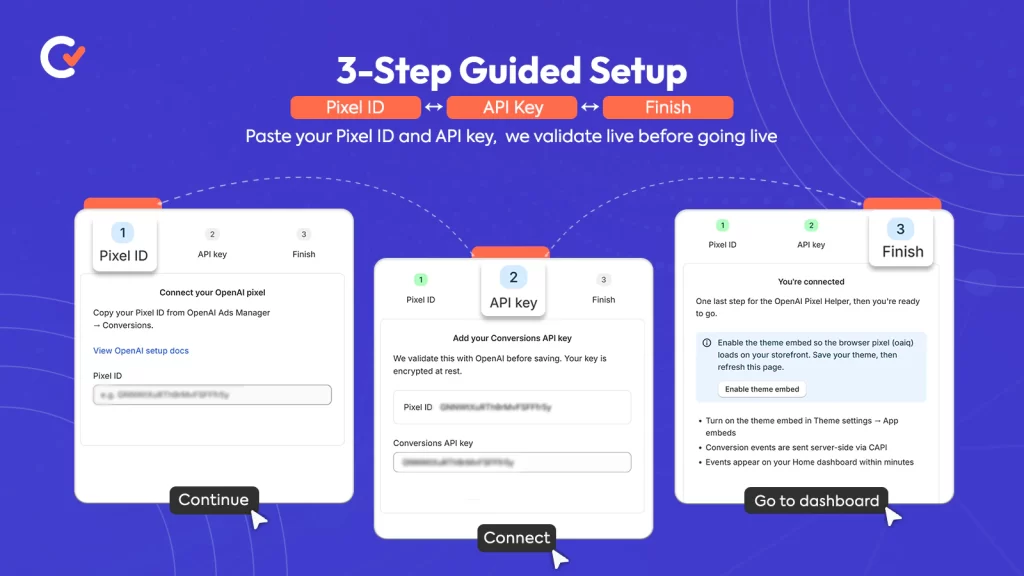
Just connect your store, paste your pixel ID, and verified server-side events start flowing right away. There’s no code to write, no webhook to configure by hand, and no ongoing maintenance to worry about when an ad platform updates its API — Count keeps that connection current on your behalf, quietly, in the background, so you can focus on running campaigns instead of babysitting tracking infrastructure.

Not sure which package fits your store, or want our team to set this up and manage the whole thing for you end to end? Take a look at our services and pricing.

Frequently Asked Questions

Do I need to understand code to set up server-side tracking? No. That’s the entire point of an app like Count. It handles the backend connection through a one-click Shopify install, so you never need a developer or any code, regardless of your technical background.

Is server-side tracking only useful for OpenAI Ads? Not at all. It benefits every ad platform you run, including Meta and Google, since both have their own server-side tracking equivalents already built into their ecosystems. The same underlying fix — send the event from the server, not the browser — applies across all of them equally.

How much better is server-side tracking, really? Browser-only pixels typically capture around 60–65% of real conversions. A properly configured server-side connection, on the other hand, typically captures 99%+. That gap means roughly a third of your actual sales could currently be invisible to your ad platform’s algorithm, distorting everything from reported ROAS to audience targeting.

Do I need to remove my existing pixel to add server-side tracking? Not necessarily. Many merchants run both together side by side, but they need to share event IDs so the same sale isn’t double-counted across both systems. Some eventually switch to server-side tracking alone, once they’ve confirmed it captures everything reliably on its own.

How long does setup actually take? With Count, setup means a one-click Shopify App Store install, followed by pasting your pixel ID. Most merchants see verified, server-side events flowing within minutes of finishing that short process.

Will switching to server-side tracking change my numbers overnight? Yes, usually for the better, and often noticeably so. Most merchants see their reported conversions and revenue rise once server-side tracking is verified and running, simply because the platform starts seeing sales it was missing all along. That’s not new revenue appearing from nowhere — it’s revenue you were always generating, finally showing up where it belongs, in the dashboard where you make real decisions.

Does this work if I’m testing a brand-new ad channel like OpenAI Ads? Yes, and arguably it matters even more there. A brand-new channel with no track record is exactly the situation where you can least afford bad data — you’re trying to decide whether the channel deserves real investment, and an incomplete tracking setup can make a genuinely good channel look like a failure before it ever gets a fair test.

Why Browser Pixels Miss Your Conversions (and How to Fix It)

Here is a number that should bother you more than it probably does: on a healthy ecommerce store running a standard browser pixel, your system never records roughly one in three conversions. Not delayed. Not attributed to the wrong channel. Simply gone — a real sale, real money in your bank account, that your ad platform never hears about.

You don’t feel this as a crisis because it doesn’t look like one. There’s no error message. Nothing turns red. Your dashboard shows numbers, the numbers look plausible, and you make decisions on them every single day. That is exactly what makes browser-pixel undercounting the most expensive problem most merchants never diagnose. Your ROAS looks worse than it is, your best campaigns look mediocre, and the algorithm optimizing your spend works against a picture of reality with a third of the pixels missing.

This post covers why that happens — the specific, mechanical reasons a browser pixel drops conversions — and the one architectural change that fixes it.

What a Browser Pixel Actually Is (and Why That’s the Problem)

A browser pixel is a piece of JavaScript that runs inside your shopper’s browser. When someone views a product, adds to cart, or completes a purchase, the pixel should fire — execute, package up the event, and send it to your ad platform.

The entire model rests on one fragile assumption: that the code will run, in the shopper’s browser, at the exact moment the event happens, and successfully reach an external server.

Every link in that chain now faces attack. The browser no longer acts as a neutral pipe that faithfully delivers your events. In 2026 it behaves as an actively hostile environment for third-party tracking — by design, by regulation, and by the choices of the people who make browsers and the people who use them. Conversion tracking accuracy collapses not because your setup broke, but because the ground underneath the browser pixel model shifted.

Here are the four holes, in order of how much damage they do.

iOS Intelligent Tracking Prevention (ITP)

Apple’s Intelligent Tracking Prevention is the single biggest reason your purchase events go missing, and it grows stricter with every Safari release.

ITP caps the lifetime of client-side cookies — in many cases to seven days, or as little as 24 hours for cookies that certain flows create. Here’s why that quietly destroys ecommerce attribution: a shopper clicks your ad on Monday, browses, leaves, and comes back to buy on the following Thursday. The cookie that tied that purchase back to the ad click has already expired. The sale happens. The attribution doesn’t.

It gets worse at the moment of purchase. Shopify checkout — and especially accelerated checkouts like Shop Pay — frequently redirects to a different domain to process payment. ITP deliberately severs exactly these cross-domain redirects. So the highest-value event you have, the purchase, fires at the exact moment the browser is most likely to have lost the thread.

And this isn’t a fringe audience. On most DTC stores, iOS makes up the majority of mobile traffic. ITP isn’t shaving a rounding error off your data — it’s eating your best customers’ purchases.

Ad Blockers and Tracking Protection

Somewhere between a quarter and a third of internet users now run an ad blocker or a browser with tracking protection switched on by default. Brave blocks trackers out of the box. Firefox turns Enhanced Tracking Protection on by default. Safari runs its own. Every major ad-blocking extension ships with filter lists that name conversion pixels explicitly.

When one of these runs, your browser pixel doesn’t fire slowly or partially. It doesn’t fire at all. The blocker intercepts the request before it ever leaves the device. That customer buys, gets their confirmation email, becomes a repeat purchaser — and to your ad platform, they never existed.

The cruel irony: the people most likely to run ad blockers skew younger, more tech-literate, and higher-income — frequently your most valuable segment. Browser-pixel undercounting isn’t random noise you can average out. It skews against exactly the buyers you most want the algorithm to find more of.

The Cross-Device Gap

People don’t shop in a straight line on one device anymore. They discover on their phone during a commute, research on a laptop at work, and buy on a tablet on the couch. A browser pixel sees three disconnected sessions on three different devices, with no thread linking them.

The ad that started the journey fired an event on device one. The purchase fired on device three. A browser pixel has no mechanism to know those are the same human. So the click earns no credit, your platform attributes the purchase to “direct” or “organic,” and your paid channels look weaker than they are. Every cross-device purchase is a conversion your browser pixel tracking structurally cannot connect.

The Closed Tab, the Slow Network, the Race Condition

Even when nothing actively blocks you, the browser stays unreliable. The purchase pixel should fire on the thank-you page. But:

  • The shopper closes the tab the instant payment confirms, before the page fully loads.
  • Their connection drops on a train, in a lift, in a dead zone.
  • The pixel script loses a race against the page unload and never executes.
  • A subscription or upsell app intercepts the confirmation flow, and the pixel never gets its moment.

None of these are edge cases. At scale they levy a steady, silent tax on every campaign you run — and they hit the purchase event hardest, because the purchase happens last, when the shopper is most likely to have already moved on.

What This Costs You (in Decisions, Not Just Data)

Undercounting isn’t a reporting inconvenience. It corrupts your decisions, and it compounds three ways.

Your ROAS reads low, so you underspend

If you capture ~64% of sales, your reported return runs ~36% too pessimistic on every campaign. Winners look like break-evens. You pause things that were quietly printing money.

The algorithm optimizes toward the wrong people

Modern ad platforms — Meta, Google, and now OpenAI Ads — are machine-learning systems that learn from the conversions you report. Feed them a biased 64% and they’ll faithfully find more people like the 64% who happened to be trackable, not more people like your actual best buyers. The blind spot doesn’t just hide performance; it actively teaches the machine the wrong lesson.

Your channels fight over phantom credit

Cross-device and expired-cookie gaps push real paid conversions into “direct” and “organic,” so you systematically under-credit the paid channels that actually drive growth, and over-invest in the ones that merely catch the last click.

You cannot fix a decision problem with a better dashboard. You have to fix the data underneath it.

The Fix: Move the Event Off the Browser

The whole category of failure above shares one root cause — the event depends on the browser. Remove that dependency and every one of these holes closes at once.

That’s what a server-side pixel does. Instead of relying on JavaScript running in a shopper’s browser, a server-side setup confirms the conversion from your store’s server. When Shopify records an order, the order webhook fires — from Shopify’s infrastructure directly to the ad platform’s Conversions API. No browser in the loop.

Walk it back through the four holes:

  • ITP? Irrelevant. No client-side cookie expires, no cross-domain redirect breaks. The order exists on Shopify’s server; the server reports it.
  • Ad blockers? Can’t touch it. A blocker lives in the browser and can only stop what the browser sends. A server-to-server call never goes near the browser.
  • Cross-device? The order record itself confirms the purchase, tied to the actual transaction, not stitched together from device-bound sessions.
  • Closed tabs and dead zones? The webhook fires when Shopify records the order — whether or not the shopper’s browser stays open, connected, or even switched on.

Serious advertisers have run this same architecture on Meta and Google for years through their Conversions APIs. It isn’t exotic. It’s the standard the browser-pixel model quietly stopped being able to meet.

The One Thing You Must Get Right: Deduplication

Keep the browser pixel and add server-side delivery — that combination is ideal, because the browser still catches on-site events like product views the server never sees. But now both tracks can report the same purchase. Without a shared identifier, the platform counts that sale twice, and you’ve traded undercounting for overcounting. The fix: an event_id built from the stable Shopify order ID, which you send identically on both tracks, so the platform recognizes and merges the duplicate.

How Count Closes the Gap

Count is a Shopify app that installs your ad pixel server-side in one click — no theme edits, no code, no developer.

Here’s what it does about each problem on this page:

  • Server-side delivery via Shopify webhooks. Shopify’s servers confirm purchases, not fragile browser scripts — so ITP, ad blockers, and closed tabs stop mattering. The measured result: a 99.4% conversion match rate against actual Shopify orders, versus roughly 64% browser-only.
  • Automatic deduplication. Count matches browser and server events by order ID, so it reports each conversion exactly once. You get the completeness of server-side without the double-counting trap.
  • Exact order values. Count reports revenue, currency, discounts, and refunds precisely — so your ROAS reflects reality instead of a browser’s best guess.
  • Consent-aware by default. It reads Shopify’s Customer Privacy API and only sends events for shoppers who consented under your region’s rules. Closing the accuracy gap doesn’t mean opening a compliance one.
  • A real-time event log so you can watch page views, add-to-carts, and purchases stream in — and verify the gap closed instead of taking it on faith.
  • Under 60 seconds from checkout to the event landing in your ad platform, with 100% checkout coverage including Shop Pay and redirect flows.

Setup takes under two minutes, and a free plan covers you — no paywall hides the full server-side pixel. Accuracy is the product, not the upsell.

Install Count on Shopify — free →

The Honest Bottom Line

Browser pixels don’t fail because you set them up wrong. They fail because the browser stopped being a reliable place to measure conversions — and the trend runs one direction only. ITP gets stricter, ad blockers get more common, privacy defaults get tighter. Every quarter, the browser-only merchant loses a little more of their own data.

You can keep making decisions on 64% of your sales, or you can move the event where nothing can block it. The gap is real, it’s measurable, and you can fix it in the time it takes to read this sentence twice.

If you run — or plan to run — OpenAI Ads on Shopify, this isn’t optional. A brand-new channel with a thin auction is the worst place to fly on incomplete data: it’s how you kill a winner before it proves itself, or fund a loser long after you should’ve cut it. Fix the measurement first. Everything downstream depends on it.

Frequently Asked Questions

Q1: How many conversions do browser pixels actually miss?

On a typical Shopify store, a browser-only pixel captures roughly 64% of actual sales — meaning about a third go unrecorded. The exact figure depends on your traffic mix (more iOS and more ad-blocker users means a bigger gap), but undercounting of 30% or more is common and largely invisible, because nothing in your dashboard flags the missing events.

Q2: Why does iOS specifically hurt conversion tracking accuracy?

Apple’s Intelligent Tracking Prevention (ITP) limits how long client-side cookies survive — often to seven days or less — and severs the cross-domain redirects that Shopify checkout and Shop Pay rely on. A shopper who clicks today and buys next week, or whom a payment domain redirects mid-checkout, frequently loses the cookie that ties the purchase to the ad. Since iOS makes up the majority of mobile traffic on most DTC stores, this alone accounts for a large share of the gap.

Q3: What is a server side pixel, and how is it different?

A server-side pixel confirms conversions from your store’s server instead of the shopper’s browser. When Shopify records an order, a webhook sends the purchase event directly to the ad platform’s Conversions API — no browser, no client-side cookie, nothing an ad blocker or ITP can intercept. Serious advertisers already run this same architecture on Meta and Google.

Q4: If I switch to server-side, will my sales get double-counted?

Only if you run both tracks without deduplication. The best setup keeps the browser pixel (for on-site events) and adds server-side delivery (for reliable purchases), with a shared event_id built from the Shopify order ID so the platform merges the duplicate. Count handles this automatically by matching events on order ID, so it reports every sale exactly once.

Q5: Do I need Shopify Plus or a developer for server-side tracking?

No to both. Server-side delivery works on every Shopify plan because it rides on Shopify’s order webhook, not on restricted checkout scripts (which is exactly why browser approaches struggle on non-Plus plans). And with an app like Count, install takes one click — no theme edits, no code, no developer.

Q6: Does fixing the tracking gap create a privacy or consent problem?

Not if the tool handles it. Count reads Shopify’s Customer Privacy API and only sends events for shoppers who consented under your store’s settings and regional rules. Server-side doesn’t mean consent-blind — it means a properly built app respects the consent state deliberately, out of the box.

How Much Do OpenAI Ads Cost? A 2026 Budget Breakdown

OpenAI Ads are quickly becoming one of the most interesting acquisition channels for ecommerce brands. Instead of competing in crowded search results or social feeds, businesses can now reach users while they’re actively asking ChatGPT for recommendations, product comparisons, and buying advice.

As more brands experiment with OpenAI Ads, one question comes up almost immediately:

How much do OpenAI Ads actually cost?

The short answer is that OpenAI Ads are still in an early stage compared to platforms like Google Ads or Meta Ads. Pricing isn’t fixed, competition is still developing, and many advertisers are discovering that costs can actually be lower than mature advertising platforms—especially when campaigns are optimized correctly.

In this guide, we’ll break down:

  • Average CPMs and CPCs
  • Daily budgets for testing
  • Real campaign budget examples
  • OpenAI Ads vs Google Ads costs
  • Hidden costs most advertisers forget
  • Shopify tracking considerations
  • Which Shopify apps support the OpenAI Ads Pixel
  • When it makes sense to work with an OpenAI Ads management team

Why OpenAI Ads Are Different

Traditional advertising interrupts people while they’re scrolling or searching.

OpenAI Ads work differently.

Instead of showing an ad to someone casually browsing, your products appear during an active conversation where users are asking questions like:

  • What’s the best coffee grinder under $200?
  • Which protein powder tastes best?
  • Best leather shoes for work?
  • What skincare routine should I start with?

That means the intent is often much stronger than traditional display advertising.

For ecommerce brands, this creates an opportunity to reach shoppers much closer to making a purchase.

How OpenAI Ads Pricing Works

Unlike Google Ads, OpenAI Ads don’t currently have decades of advertiser competition driving prices higher.

While pricing can vary by industry, audience, and campaign quality, early advertisers are generally seeing ranges like these:

MetricTypical Range
CPM$25–$60
CPC$3–$5
Daily Budget$25–$100+
Minimum SpendNo official minimum

These numbers aren’t guarantees—they’re realistic planning figures that many early advertisers use when budgeting campaigns.

Understanding CPM

CPM means Cost Per 1,000 Impressions.

If your CPM is:

$30

then every 1,000 impressions costs approximately:

$30

Example:

Budget: $300

Average CPM: $30

Estimated impressions:

10,000

Higher-intent audiences often cost more because advertisers compete for valuable placements.

Understanding CPC

CPC means Cost Per Click.

If your campaign averages:

$4 CPC

and your daily budget is:

$50

you’ll receive approximately:

12–13 clicks per day.

Those clicks are typically higher intent than many social platforms because users are already asking purchasing questions.

What Does a Real Test Budget Look Like?

One of the biggest misconceptions is that you need thousands of dollars before trying OpenAI Ads.

In reality, many brands begin with a controlled test.

Small Test

Daily Budget:

$25/day

Monthly Spend:

Approximately $750

Goal:

  • Validate audience
  • Measure CTR
  • Verify tracking
  • Collect conversion data

This is often enough to determine whether OpenAI Ads deserve additional investment.

Growth Test

Daily Budget:

$50/day

Monthly Spend:

Approximately $1,500

Suitable for:

  • Established Shopify stores
  • Product launches
  • Seasonal campaigns
  • Multiple audiences

Scaling Budget

Daily Budget:

$100+

Monthly Budget:

$3,000+

Typically used when advertisers already have proven campaigns and reliable conversion tracking

OpenAI Ads vs Google Ads Budget

Many ecommerce teams compare OpenAI Ads with Google before deciding where to invest.

CategoryOpenAI AdsGoogle Ads
Typical CPM$25–60Often higher depending on industry
Typical CPC$3–5Highly competitive keywords may cost much more
CompetitionLowerVery high
Buyer IntentHigh conversational intentHigh search intent
Learning CurveNew platformMature ecosystem

Google still offers enormous reach.

However, OpenAI Ads give advertisers access to users during natural buying conversations instead of traditional search results.

Hidden Costs Most Businesses Forget

Ad spend isn’t the only cost involved.

Successful campaigns usually include:

  • Conversion tracking
  • Pixel installation
  • Attribution
  • Creative optimization
  • Landing page improvements
  • Reporting
  • Campaign management

Without proper tracking, it’s impossible to know whether your campaigns are actually generating revenue.

Why Tracking Matters

Imagine spending:

$2,000

on OpenAI Ads.

You receive:

  • 140 clicks
  • 28 purchases

But your analytics only record:

16 purchases.

Suddenly your ROAS looks much worse than reality.

Incomplete attribution leads businesses to pause campaigns that are actually profitable.

That’s why accurate conversion tracking is one of the most important parts of any OpenAI Ads strategy.

Shopify + OpenAI Ads Pixel

If your store runs on Shopify, installing the OpenAI Ads Pixel should be one of the first steps before launching campaigns.

The pixel helps measure:

  • Purchases
  • Add to Cart
  • Checkout Started
  • Page Views
  • Product Views
  • Revenue
  • Conversion Events

Accurate event tracking allows advertisers to understand which campaigns are driving actual sales—not just clicks.

Shopify Apps That Support OpenAI Ads Pixel

Several Shopify apps help merchants connect OpenAI Ads with their store.

1. UseCount (Recommended)

UseCount is designed specifically for OpenAI Ads conversion tracking.

Features include:

  • One-click Shopify integration
  • OpenAI Ads Pixel installation
  • Server-side tracking
  • Conversion API support
  • Purchase attribution
  • Revenue tracking
  • Event deduplication
  • Reliable reporting

Instead of manually configuring tracking, merchants can connect their Shopify store and begin measuring conversions in minutes.

2. Shopify Customer Events

Shopify’s native customer events framework can capture certain ecommerce interactions.

However, it generally requires additional configuration and doesn’t provide the dedicated OpenAI Ads tracking workflow that specialized apps offer.

3. Google Tag Manager (Advanced Setup)

Some businesses choose to configure OpenAI Ads tracking through Google Tag Manager.

While flexible, this approach often involves:

  • Custom JavaScript
  • Event mapping
  • Manual testing
  • Ongoing maintenance

For many merchants, a purpose-built Shopify app is faster and easier to manage.

How Much Should Ecommerce Brands Budget?

A practical starting point depends on the stage of your business.

Store SizeSuggested Monthly Budget
New Store$750–$1,000
Growing Brand$1,500–$3,000
Established Ecommerce Brand$3,000–$10,000+

The goal isn’t to spend the most—it’s to gather enough data to optimize campaigns and scale what works.

When Should You Hire an OpenAI Ads Team?

Managing OpenAI Ads involves more than setting a daily budget.

A managed team can help with:

  • Campaign strategy
  • Audience targeting
  • Creative testing
  • Conversion tracking
  • Shopify implementation
  • Performance optimization
  • Reporting and attribution

If you’re investing several thousand dollars each month, expert management can often improve efficiency and reduce wasted spend.

Best Practices for Keeping Costs Under Control

To maximize your advertising budget:

  • Start with a small daily budget.
  • Verify that conversion tracking is working before scaling.
  • Optimize landing pages for faster conversions.
  • Monitor CPC and CPM trends regularly.
  • Focus on high-intent audiences.
  • Scale gradually based on real performance data.
  • Review attribution reports before making budget decisions.

Final Thoughts

OpenAI Ads are still in the early stages, giving businesses an opportunity to reach high-intent shoppers before competition increases.

While costs vary by industry and campaign quality, many advertisers begin testing with around $25 per day, monitor performance, and scale once they have reliable conversion data.

Just as important as your budget is your ability to measure results. Without accurate tracking, it’s difficult to know which campaigns are driving revenue and which need improvement.

If you’re running a Shopify store, combining a realistic test budget with reliable OpenAI Ads Pixel tracking can give you the confidence to optimize campaigns and grow efficiently.

Continue Learning

If you’re new to OpenAI Ads, read our complete guide:

OpenAI Ads for Ecommerce: The Early Movers Guide (2026)

It covers campaign strategy, setup, targeting, and best practices for merchants looking to get started.

Frequently Asked Questions

Is there a minimum budget for OpenAI Ads?

There is currently no official minimum spend, but many advertisers start testing with around $25 per day.

What is a typical OpenAI Ads CPC?

Many early campaigns report CPCs in the range of $3–$5, though this can vary depending on targeting and competition.

What CPM should I expect?

A reasonable planning range is $25–$60 CPM, but actual costs depend on your campaign and audience.

Can Shopify stores track OpenAI Ads conversions?

Yes. By installing the OpenAI Ads Pixel through a compatible Shopify integration such as UseCount, merchants can track purchases, revenue, and other key conversion events.

Should I increase my budget immediately?

It’s generally better to validate tracking and campaign performance with a smaller budget first, then scale once you have reliable conversion data.

What Is the OpenAI Conversions API (and Why Shopify Stores Need It)

If you’ve read our guide on OpenAI Ads for Shopify or compared ChatGPT Ads against Google and Meta, you’ve already seen one phrase repeated more than any other: server-side tracking isn’t optional. This guide unpacks exactly what that means — what the OpenAI Conversions API actually is, why browser pixels quietly fail on Shopify, and how CAPI closes that gap.

The Problem: Your Browser Pixel Is Lying to You (A Little)

For most of the last decade, a single line of JavaScript sitting in your theme was enough to tell an ad platform “this person converted.” That model is breaking down, and it’s not a Shopify problem specifically — it’s a browser problem.

Three things are quietly eating your conversion data:

Ad blockers. A meaningful share of shoppers run browser extensions that block third-party tracking scripts outright. If your pixel never fires, the sale never gets reported — even though it happened.

iOS privacy protections. Apple’s Intelligent Tracking Prevention and related privacy features restrict how long browser-based cookies persist and how much cross-site data a pixel can collect. On mobile traffic — which is most Shopify traffic — this alone can account for a large share of missed events.

Cookie decay. Even when a pixel does fire, first-party and third-party cookies used to stitch a click to a later purchase have shrinking lifespans. A shopper who clicks an ad on Monday and completes checkout on Wednesday may already have lost the cookie that would have linked the two events together.

Add it up, and industry benchmarks consistently show browser-only pixels capturing somewhere around 60–65% of actual conversions — meaning roughly a third of your real sales never make it back to the ad platform at all.

That’s not just a reporting inconvenience. Ad platforms optimize on the data they receive, not the data that actually happened. If OpenAI Ads only sees two-thirds of your conversions, its algorithm is learning from a distorted picture of who actually buys from you — and it will keep scaling toward whatever audience does show up in that incomplete data, even if that’s the wrong audience.

What the OpenAI Conversions API Actually Is

The OpenAI Conversions API (CAPI) is a server-to-server connection that sends conversion events — page views, add-to-carts, purchases — directly from your Shopify store’s backend to OpenAI’s ad platform, bypassing the browser entirely.

Instead of relying on a script running in a shopper’s browser (which can be blocked, delayed, or expired), the event is sent from Shopify’s own servers the moment it happens. No cookie, no ad blocker, and no browser privacy setting sits between the sale and the platform that needs to know about it.

This is the same architectural shift that Meta’s Conversions API and Google’s Enhanced Conversions already made for their own platforms — OpenAI Ads is simply the newest channel to require it, and because the ecosystem around it is younger, fewer merchants have it configured correctly yet.

Browser Pixel vs. Server-Side (CAPI): Side by Side

Browser Pixel OnlyServer-Side (CAPI)
Where the event firesUser’s browserShopify’s server
Blocked by ad blockersYesNo
Affected by iOS privacy limitsYesNo
Survives checkout redirectsOften lostCaptured
Typical match rate vs. real orders~60–65%99%+
Delay to platformImmediate (if it fires)Typically under 60 seconds
Algorithm seesPartial, biased sampleFull, accurate order data

Shared Event IDs and Deduplication: The Part Everyone Gets Wrong

Here’s where a lot of DIY CAPI setups go sideways. If you run both a browser pixel and a server-side connection at once — which many merchants do, intentionally or by accident — you now have two separate systems capable of reporting the same purchase. Without deduplication, that single sale gets counted twice, inflating your reported conversions and quietly corrupting your ROAS numbers in the opposite direction of the original problem.

The fix is a shared event ID: a unique identifier generated once per conversion event and attached to both the browser-side and server-side copies of that event, if both exist. When OpenAI’s system receives two events carrying the same ID, it recognizes them as duplicates and counts the conversion once — taking whichever signal arrived with more complete data.

Getting this right requires:

  • Generating a consistent, unique event ID at the moment of purchase (usually the Shopify order ID or a derived hash).
  • Passing that same ID through both the browser pixel call (if one exists) and the server-side API call.
  • Timing the events correctly, since deduplication windows are typically short.

This is genuinely fiddly to build correctly by hand, and it’s the step most manual implementations skip entirely — which either double-counts conversions or, if a merchant disables the browser pixel to avoid duplicates, throws away a signal that could have filled in gaps the server-side event missed.

What This Means for Shopify Specifically

Shopify introduces a few extra wrinkles that make server-side tracking more important than on a fully custom storefront:

Checkout redirects. Shopify’s checkout flow, especially with Shop Pay, involves domain transitions that can break browser-based tracking mid-funnel. A server-side connection sourced from Shopify’s own order data sidesteps this entirely, since it doesn’t depend on the browser surviving the redirect.

Order value accuracy. Server-side events pull directly from the confirmed order object — including discounts, taxes, and currency — rather than estimating value from a client-side cart snapshot that may not match what was actually charged.

No developer required, if you use the right app. Manually building a CAPI integration means writing and maintaining backend code that listens for Shopify webhooks, formats events to OpenAI’s schema, handles authentication, and manages deduplication — ongoing engineering work most Shopify merchants don’t have the bandwidth for.

The Easy Button: How Count Handles This for You

This is exactly the gap Count was built to close. Instead of building and maintaining a custom CAPI integration, Count installs directly from the Shopify App Store and handles the entire server-side connection automatically:

  • One-click install — no developer, no theme code, no webhook configuration to manage yourself.
  • Automatic event ID generation and deduplication — page views, add-to-carts, and purchases are sent with proper shared event IDs, so nothing gets double-counted.
  • Verified 99%+ match rate against your real Shopify order data, checkable directly in your Count dashboard.
  • Sub-60-second delivery from checkout to a recorded event in OpenAI Ads.
  • Zero code — the entire setup is App Store install, paste your pixel ID, done.

If you’re running (or planning to run) OpenAI Ads on Shopify, this is the single highest-leverage fix available before you spend another dollar on the platform. An accurate data feed doesn’t just improve your reporting — it changes what the algorithm actually learns to optimize toward.

Don’t want to set this up yourself? Our team can handle the full OpenAI Ads setup and management for you.

Frequently Asked Questions

Is the OpenAI Conversions API the same as a browser pixel? No. A browser pixel fires from the shopper’s device and can be blocked or lost to privacy restrictions. CAPI sends the same event from your store’s server, independent of the browser entirely.

Do I need both a browser pixel and CAPI? Not necessarily. Many merchants run CAPI alone once it’s properly configured, since it captures a more complete and accurate signal on its own. If you do run both, they must share event IDs so the same conversion isn’t counted twice.

How much of a difference does server-side tracking actually make? Industry benchmarks put browser-only pixel match rates around 60–65% of real conversions, versus 99%+ for a properly configured server-side connection — meaning a third of your actual sales may currently be invisible to the algorithm.

Do I need a developer to set up CAPI on Shopify? Only if you’re building it manually. Apps like Count handle the entire server-side connection, including event ID generation and deduplication, through a one-click Shopify install.

How fast does a server-side conversion show up in OpenAI Ads? With a properly configured connection, typically under 60 seconds from checkout completion to a recorded event in the ad platform.

ChatGPT Ads vs Google Ads: What’s Different in 2026

Google search ads target buyers through keyword-based queries — for example, someone types “CRM software pricing” because they already know what they need. ChatGPT ads, in contrast, appear inside conversational research sessions — someone asks “what’s the best CRM for a 20-person sales team that integrates with Salesforce?” because they’re still deciding.

Both channels reach high-intent buyers. However, neither replaces the other. And as a result, treating them as interchangeable is the fastest way to waste budget on both.

This guide compares ChatGPT ads vs Google ads across every dimension that determines where your next dollar should go: targeting, cost by industry, auction mechanics, buyer mindset, ad formats, audience reach, click-through rates, tracking infrastructure, and which businesses should prioritize which platform.

Quick Verdict

Google Ads wins for capturing buyers who already know what they want and are ready to act. The targeting is more mature, the volume is higher, and consequently the ROI is more predictable in established categories.

ChatGPT Ads win for reaching buyers who are still researching, comparing, and forming a view. Costs run significantly lower right now because few advertisers have entered the market yet.

The best strategy for most ecommerce brands is running both: ChatGPT to reach buyers early and shape the consideration set, then Google to close them when they’re ready. In other words, the brands visible on both sides of the journey close more revenue than brands that only show up at the bottom of the funnel.

ChatGPT Ads vs Google Ads at a Glance

FeatureChatGPT AdsGoogle Search Ads
Platform launchFeb 2026 pilot; self-serve May 20262000 (25+ years of history)
Targeting basisConversational contextExplicit keywords
Buyer stageResearch and discoveryHigh-intent, near-purchase
Auction typeRelevance-weighted, second-priceQuality Score–weighted
CPC (typical)$3–$5$2–$50+ (category dependent)
CPM (typical)$25–$60Varies widely
Minimum spendNone officially; ~$25+/day for deliveryNo official minimum
Ad formatText card below AI responseText, Shopping, Display, Video, PMax
Competition level (2026)Very low — early-mover windowSaturated in most categories
RetargetingNot yet (roadmap item)Yes, across Search and Display
Remarketing audiencesNot availableExtensive
Behavioural dataNone — purely contextualExtensive (Google’s first-party data)
Reachable audience900M+ weekly users (Free/Go tier only)8B+ searches per day
Privacy modelContextual only, no user data sharedDependent on consent and cookies
Conversion trackingPixel + Conversions API (new)Mature, full attribution modelling

What the table tells you

The comparison shows a clear structural story. Google has 25 years of infrastructure, tooling, and advertiser competition baked in. ChatGPT, on the other hand, has a thin auction, a contextual-only privacy model, and CPCs that haven’t felt the pressure of a crowded market yet. Both of those realities will change — the question is simply which direction each one moves.

How Buyer Intent Differs Between the Two Platforms

Google captures intent that has already formed. ChatGPT captures intent that is still forming. That single distinction, therefore, changes everything about what your ad should say, what your offer should be, and what you should measure as success.

Google: the buyer knows what they want

A user typing “buy CRM software” or “best running shoes under $150” into Google has already narrowed their decision. They know the category, they’ve probably shortlisted options, and they’re one click from converting. As a result, Google Search Ads intercept people at that near-purchase moment — the most valuable real estate in digital advertising.

ChatGPT: the buyer is still deciding

A user asking “what should I look for in a CRM for a small sales team?” or “how do I pick trail running shoes for flat feet?” is, by contrast, in discovery mode. They’re building their mental model of the category before they decide what to search for, who to contact, or what to buy. Consequently, ChatGPT Ads reach buyers at that earlier, open stage.

The decision-gap: why you need both sides

There’s a structural gap between where buyers research and where they convert. Specifically, a buyer asks ChatGPT for the best options, forms a shortlist, then opens a new tab and searches Google for the brand by name to buy.

Brands that only run Google ads therefore catch the second click but never enter the consideration set in the first place. Similarly, brands that only run ChatGPT ads get into the consideration set but lose the conversion to whoever owns the branded search result.

The full-funnel play is to show up on both sides of the gap — ChatGPT shapes which brands the buyer considers, and then Google captures the purchase when they’re ready to act.

Buyer Mindset: The Factor Most Advertisers Underestimate

The same person uses Google and ChatGPT in a fundamentally different mental state. Because of this, what works as an ad on one platform fails on the other.

Google: outcome-focused

The user has a goal and moves toward it. A direct, action-oriented ad matches that mindset. “Get a quote.” “Start your free trial.” “Buy now — free shipping.” These CTAs work precisely because the user is ready.

ChatGPT: exploration-focused

The user, however, learns, compares, and builds understanding. A hard-sell CTA interrupts that mode rather than fitting it. Instead, what works is an ad that adds value — “Here’s what to look for when choosing a growth agency” or “See how businesses like yours approach this decision.” The offer leads with usefulness first, and the conversion follows naturally.

The creative implication

If you run Google-style ads on ChatGPT without adapting them to the conversational context, your click-through rates will suffer. More specifically, the relevance-weighted auction actively penalizes generic, hard-sell copy. ChatGPT rewards specific, intent-matched messaging far more than brand slogans, because the matching happens at the conversation level rather than the keyword level.

Ad Formats: What Your Ads Actually Look Like

Google’s format library: broad and mature

Google offers the widest range of ad formats in digital advertising. Search ads appear as text links at the top of results pages. In addition, Shopping ads show product images, prices, and reviews with a direct click-to-buy. Beyond that, Display ads run across millions of websites, YouTube pre-roll and mid-roll reach video viewers, and Performance Max campaigns run across all Google surfaces simultaneously. As a result, the format depth gives experienced advertisers extensive creative and placement flexibility.

ChatGPT’s format: focused and text-driven

ChatGPT Ads, in contrast, appear as a single, clearly labelled sponsored card below the AI’s organic response. The format includes the advertiser’s name, favicon, headline, brief descriptive copy, an optional image, and a landing page link.

OpenAI calls this “answer independence” — meaning the ad system runs on infrastructure physically separate from the model generating responses, so advertising dollars cannot influence what ChatGPT actually says. The trade-off for that independence, however, is reach: ads only serve to logged-in adult users on the Free and Go tiers in the US, Canada, Australia, and New Zealand. Plus, Pro, Business, Enterprise, and Education subscribers see no ads.

Why text-only can work in your favour

The text-driven format actually works in your favour if your copy is strong. Without visual competition from a dozen other ads on the same page, a well-written ad that directly addresses what the user just asked about stands out. In other words, the quality of the writing matters more here than on any visual-heavy platform.

Cost Comparison: What You Actually Pay, by Industry

The cost gap between ChatGPT Ads and Google Ads is substantial right now. It will not, however, stay this way.

CategoryChatGPT Ads CPCGoogle Search CPCDifference
B2B software / SaaS$3–$5$15–$50ChatGPT 3× to 10× cheaper
Professional services$3–$5$10–$35ChatGPT 2× to 7× cheaper
Legal and financial$3–$5$20–$100+ChatGPT up to 20× cheaper
Ecommerce / retail$3–$5$1–$5Similar; Google slightly cheaper
Healthcare$3–$5$5–$25ChatGPT 1× to 5× cheaper

The cost advantage hits hardest in B2B and high-value service categories where Google has become extremely competitive over two decades. For ecommerce with lower commercial-intent CPCs, on the other hand, the price gap narrows — although the thin auction still offers a first-mover edge that ecommerce brands rarely see on a new channel.

What changed in 2026 that most comparisons miss

Several important shifts happened in quick succession. First, CPC bidding for ChatGPT ads went live April 21, 2026, then rolled broadly with the self-serve Ads Manager on May 5. Second, the $50,000 pilot minimum is gone — any approved advertiser now sets a budget that fits their test. Third, the Measurement Pixel and Conversions API launched, closing most of the measurement gap that defined the early pilot.

That combination matters because the “ChatGPT is premium-only, Google is flexible” framing was true in February 2026 and false by May. As a result, SMBs, startups, and in-house teams now buy ChatGPT ads at the same budget level they’d test a new Google campaign.

Click-Through Rate: The Honest Caveat

CTR is where the two platforms still diverge most sharply, and it’s important to understand why.

MetricChatGPT AdsGoogle Search Ads
Average CTR~0.68%4–6%
Top quartile~1.0%~6–7%
Best-in-class~1.57%~7.94%

Why the gap doesn’t mean what you think

Those numbers reflect fundamentally different placements, not platform quality. A Google Search ad appears at the top of a results page from a user who typed a buying query — so the click is the natural next step. A ChatGPT ad, by contrast, appears below an AI response that often already answered the question — meaning the user has less structural reason to click away.

ChatGPT’s lower CTR, therefore, doesn’t necessarily mean lower value. The platform’s strength sits in influence and consideration — the user may not click today but instead searches your brand name on Google tomorrow. Consequently, measuring ChatGPT Ads purely on last-click CTR undervalues their actual role in the funnel.

How Each Auction Actually Works

Understanding the auction mechanics explains why the same budget produces very different results on each platform.

Google’s auction: Quality Score rules

Google weighs your bid against Quality Score — a composite of expected click-through rate, ad relevance, and landing page experience. It’s mature, well-documented, and heavily gamed by a decade of SEM best practices. Essentially, win the Quality Score game and you pay less per click; lose it and you outspend competitors for worse placements.

OpenAI’s auction: relevance wins over spend

OpenAI, in contrast, runs a relevance-weighted, second-price model. The ad that wins the placement isn’t automatically the highest bidder — instead, it’s the ad with the best combined score of bid and contextual relevance to the conversation.

For example, a well-written, tightly relevant ad on a $3.50 bid regularly outperforms a generic ad sitting on a $6 bid. This represents a meaningful departure from “outspend the competition” logic, and as a result it levels the playing field for smaller brands that can’t outbid category leaders on Google.

The privacy trade-off

One structural limitation is also worth knowing: OpenAI does not share the raw content of a user’s prompt with advertisers, for privacy reasons. You know your ad matched contextually — but you don’t see the exact conversation that triggered it. Because of this, accurate post-click measurement becomes more important on ChatGPT Ads than on Google, not less. If you can’t see the pre-click intent, your conversion tracking accuracy carries the entire weight of optimization.

Audience Size: Who You Can Actually Reach

Google’s scale

Google processes over 8 billion searches per day. The volume of available impressions is therefore enormous, and for established commercial categories, Google delivers meaningful traffic at almost any budget level. That scale and reliability is precisely why Google remains the dominant paid channel for most performance advertisers.

ChatGPT’s reachable audience

ChatGPT has over 900 million weekly active users — however, ads only appear to Free and Go tier subscribers. Plus, Pro, Team, Business, Enterprise, and Education plan users see no ads.

The implication worth noting: the ad-exposed audience skews toward consumer and SMB users, while enterprise decision-makers who pay for subscriptions aren’t reachable through ChatGPT Ads. Whether that’s a limitation depends entirely on who you sell to. For Shopify ecommerce brands, specifically, the free-tier audience — tech-savvy, research-oriented, comparison-driven — often maps well to the ideal buyer profile.

Which Industries Benefit Most from Each Platform

Industry fit ultimately shifts the math on which platform deserves the larger budget share. Some verticals convert almost entirely through high-intent search; others, by contrast, spend weeks in research before any direct query happens.

Industries where ChatGPT Ads outperform on cost and fit

  • B2B SaaS and enterprise software — long evaluation cycles, high Google CPCs, research-heavy buyers
  • Professional services and consulting — buyers compare extensively before they hire
  • Legal and financial services — Google CPCs exceed $20–$100+; ChatGPT reaches the same buyer at $3–$5
  • High-consideration DTC — supplements, electronics, premium apparel where the buyer researches before committing
  • Education and online courses — learners ask ChatGPT for recommendations naturally

Industries where Google Ads remain the stronger channel

  • Ecommerce with clear product-keyword demand — “buy Nike Air Max 90” is a Google query, not a ChatGPT question
  • Local services — HVAC, plumbing, roofing, electricians; “plumber near me” is pure search intent
  • Emergency and urgent services — the buyer needs someone now, not a comparison
  • Travel with date-specific intent — “flights to London June 15” converts on Google, not in a chat

The pattern

In short, ChatGPT wins where the buyer’s first question is “which option should I consider.” Google wins where the buyer’s first question is “who can I hire right now.” Brands selling into both moments, therefore, need budget on both platforms.

Tracking: Where the Platforms Diverge on Infrastructure

Whichever platform you test, the ad only performs as well as the data it learns from — and this is where the two channels diverge again, this time on infrastructure rather than targeting.

Google’s Shopify integration: mature and native

Google has had years to build its Shopify integration. The Google & YouTube channel app handles pixel installation, catalog sync, and conversion tracking out of the box. As a result, the infrastructure is battle-tested.

OpenAI’s Shopify integration: newer, and the gap matters

Shopify, however, doesn’t yet ship a native integration for OpenAI Ads. That gap is exactly what dedicated tracking apps exist to close — and the mechanism that matters most is server-side event delivery.

A browser-based pixel loses roughly a third of your conversions to ad blockers, iOS privacy protections, and Shopify’s checkout redirects. On Google, where the algorithm draws on years of data and multiple signal sources, that loss hurts but doesn’t cripple. On ChatGPT Ads, by contrast, where the algorithm starts from zero and depends entirely on the signal you feed it, a 35% data gap teaches the model to chase the wrong buyers from day one.

How server-side tracking closes the gap

Count handles this on Shopify in one click — server-side event delivery for page views, add-to-carts, and purchases sent directly from Shopify’s backend rather than a browser script. The verified match rate against actual Shopify orders sits at 99.4%, versus roughly 64% with browser-only pixels. Deduplication by Shopify order ID ensures each sale counts exactly once, and real-time delivery gets events into your OpenAI Ads dashboard in under 60 seconds. No theme edits, no code, no developer needed. The free plan includes the full server-side pixel.

The practical takeaway: if you test ChatGPT Ads on Shopify, don’t port over your Google tracking assumptions. Instead, confirm you have a server-side connection in place before you spend a dollar — otherwise the relevance-weighted auction optimizes on a fraction of your real sales, and you’ll never know whether the channel actually worked or your data just didn’t show it.

When to Choose Google Ads, ChatGPT Ads, or Both

Prioritize Google Ads if you:

  • Sell products with clear keyword demand and transactional search volume
  • Run direct-response or ecommerce campaigns that need measurable same-session conversions
  • Need granular geo, device, or audience targeting along with remarketing
  • Operate in a local service category where “near me” searches drive the business

Prioritize ChatGPT Ads if you:

  • Sell products buyers research and compare before committing
  • Target shoppers who use AI tools during their decision process
  • Want to establish brand visibility before competitors discover the channel
  • Face high Google CPCs in your vertical and need lower-cost research-stage reach
  • Have strong copy — because the relevance-weighted auction rewards writing over budget

Run both if you:

  • Sell anything where the buyer researches before purchasing (which includes most ecommerce and B2B)
  • Want to shape the consideration set and also capture the conversion
  • Can measure across the funnel rather than relying on last-click attribution alone

How to Allocate Budget Between the Two Platforms

If you already run Google Ads and want to add ChatGPT

Don’t reduce your Google budget to fund the test — Google is proven for your store, so instead run the ChatGPT test as incremental spend. Start with a 60-day test at $25–$50/day (roughly $1,000–$1,500 total), then adapt your creative for the research mindset and measure cost per acquisition alongside click-through rate. If you simply port Google copy unchanged, your ChatGPT CTR will underperform and consequently the test tells you nothing useful.

If you’re starting from zero

Start with the channel most proven for your specific category. For most Shopify ecommerce stores, that means Google Shopping and Search first. Build a performance baseline, and then add ChatGPT Ads as your second channel once you have conversion data to compare against.

If ChatGPT is already working

Scale carefully. Increase daily budget in 20–30% increments rather than doubling overnight — because the thin auction can shift delivery patterns unpredictably at sudden budget jumps. Also make sure your conversion tracking captures every sale before you scale, since scaling on incomplete data only compounds the error.

Rather have someone handle the whole setup?

The team behind Count also sets up, launches, and manages OpenAI Ads campaigns on the same server-side foundation. The managed service starts with a free readiness audit that measures your actual conversion gap before you commit a dollar of ad spend.

The Bottom Line

Google captures demand that already exists. ChatGPT Ads, on the other hand, reach shoppers in the moment they’re actively deciding — a genuinely new slot in the funnel, not a replacement for search. The auction rewards relevance over budget, the competition is still thin, and the CPCs undercut Google in most verticals.

The channel that’s easiest to get wrong right now is the newest one, simply because the tracking infrastructure isn’t as battle-tested as Google’s native Shopify integration. Fix the measurement gap first with server-side tracking, and then the comparison stops being theoretical.

Ultimately, testing both platforms isn’t an either/or decision. It’s a question of which part of the buyer’s journey you’re under-investing in — and in 2026, the research-stage slot that ChatGPT owns is the one with the most room to grow.

Frequently Asked Questions

Q1: Are ChatGPT ads cheaper than Google ads?

In most categories, yes — ChatGPT’s $3–$5 CPC range sits below Google’s, which stretches from a couple of dollars to well over $50 in competitive verticals like legal and B2B SaaS. The gap runs widest in high-CPC industries: for instance, a legal brand paying $40+ per Google click can test ChatGPT at $3–$5 and reach users at a similar research stage. However, cost per click isn’t the full picture — Google’s captured search intent can convert at a higher rate for bottom-funnel queries, which sometimes offsets the higher CPC. Therefore, compare cost per acquisition, not just cost per click.

Q2: Does ChatGPT Ads use keyword targeting like Google?

No. OpenAI’s system matches ads to the context of an ongoing conversation rather than specific keywords. Instead, advertisers write descriptions of the topics and intent signals their ads should match, and the platform’s inference engine handles the placement. Additionally, OpenAI doesn’t share raw prompt text with advertisers for privacy reasons — so you target conversational themes, not individual search terms.

Q3: Can I retarget ChatGPT Ads visitors like I can with Google?

Not yet. Retargeting, saved audiences, and remarketing functionality sit on OpenAI’s public roadmap but weren’t available on the self-serve platform as of mid-2026. As a result, ChatGPT Ads currently function as a prospecting and consideration channel, not a remarketing one.

Q4: What’s the click-through rate on ChatGPT Ads compared to Google?

ChatGPT ads currently average around 0.68% CTR overall, with top-performing advertisers reaching roughly 1.0–1.57%. Google Search ads, by comparison, average 4–6%, with top-position ads closer to 7.94%. However, the difference reflects placement mechanics rather than platform quality — ChatGPT’s ad appears below a response that often already answered the question, so users have less structural reason to click. Consequently, measuring ChatGPT purely on last-click CTR undervalues its actual role in shaping the consideration set.

Q5: Who actually sees ChatGPT ads?

Ads serve to logged-in adult users on the Free and Go subscription tiers in the US, Canada, Australia, and New Zealand. Users on Plus, Pro, Team, Business, Enterprise, and Education plans, in contrast, see no ads. As a result, the reachable audience skews toward consumer and SMB users — while enterprise decision-makers who pay for subscriptions sit outside the addressable pool.

Q6: How do I track ChatGPT Ads conversions on Shopify?

Through a server-side connection between your Shopify store and OpenAI’s Conversions API. A browser-only pixel misses roughly a third of sales due to ad blockers and iOS privacy features, which cripples optimization on a new channel where the algorithm starts from zero. An app like Count installs server-side tracking in one click and verifies match rates against your real Shopify order data.

Q7: Should I move budget from Google to ChatGPT Ads?

Not as a replacement — instead, as an addition. Google owns bottom-funnel “buy now” intent that ChatGPT doesn’t compete for. ChatGPT, meanwhile, owns the research-and-comparison stage that Google reaches only through broader, more expensive campaigns. Therefore, run the ChatGPT test as incremental spend alongside your existing Google budget, not at its expense.

Q8: What’s the minimum budget to test ChatGPT Ads?

No platform-wide minimum spend exists as of the May 2026 self-serve launch. In practice, however, daily budgets under roughly $25 rarely deliver consistently. Most practitioners recommend $25–$50/day over a 60-day test window — roughly $1,000–$1,500 total — to gather enough conversion data for real optimization decisions.

How to Install the OpenAI Ads Pixel on Shopify (No Code)

If you have already read our early-mover guide to OpenAI Ads, you know the thesis: the auction is still thin, the intent is unusually high, and the brands that plant a flag now will spend the next two years compounding an advantage their competitors have to buy back at 3x the CPC. But there is a prerequisite that quietly decides whether any of that theory turns into revenue — your pixel.

The OpenAI Ads algorithm is a machine learning system, and machine learning systems are downstream of the data you feed them. Feed it 64% of your purchases and it will confidently optimize toward the wrong 64%. Feed it every sale, at the right value, exactly once, and it will find buyers you did not know existed. That difference is not a strategy problem. It is a fifteen-minute installation problem.

This is the literal walkthrough: App Store install, pixel connection, Pixel ID and Conversions API key, and validation — no theme edits, no Liquid, no developer, no code. We will also cover which apps on the Shopify App Store actually do this, and where each one fits.

Before You Start: What You Actually Need

Three things, and only three:

  1. An OpenAI Ads account. The pixel sends events to a data source that lives inside your OpenAI Ads account, so the account has to exist first. Head to ads.openai.com and complete business verification. As of mid-2026 the self-serve Ads Manager is open to US businesses, with ads served to Free and Go tier users in the US, Canada, Australia, and New Zealand.
  2. A Shopify store you’re an admin on. Any plan. You do not need Shopify Plus for a proper server-side setup — that is precisely the point of doing it through an app pixel and webhooks instead of checkout scripts.
  3. Fifteen minutes. Realistically less. Most of it is waiting for a test order to land.

One thing to check before anything else: your robots.txt. OpenAI’s ad crawler, OAI-AdsBot, inspects the landing pages behind your ads, and it is a separate agent from GPTBot, OAI-SearchBot, and ChatGPT-User. Block it and your product pages can be ruled ineligible before your pixel ever fires a single event. Allow all four unless you have a specific reason not to.

Step 1: Get Your Pixel ID and Conversions API Key

openai ads pixel

Everything downstream depends on two values. Both live in the same place.

  1. Log in at ads.openai.com.
  2. Open the Data Sources (sometimes labeled Measurement or Pixels) section of Ads Manager.
  3. Create a new data source for your store if one doesn’t exist. Name it something you’ll recognize in six months — yourbrand-shopify-prod, not test 2 final.
  4. Copy the Pixel ID. This is the identifier the browser-side tag uses. You’ll sometimes see it referenced as the OAIQ pixel, after the oaiq JavaScript object OpenAI’s snippet initializes. Same thing, different name.
  5. Generate and copy the Conversions API key. This is the credential that authorizes server-to-server event delivery. Treat it like a password — it does not belong in your theme, in a Google Doc, or in a Slack channel.

Paste both somewhere safe for the next ninety seconds. You will not need them again after that.

A note on OpenAI’s official snippet. The manual install path OpenAI documents has been reported to fire a spurious registration event on page load, which quietly corrupts conversion tracking for advertisers who copy-paste it into their theme. This is one of several reasons the no-code app route is not just the easier option — it is the more accurate one.

Step 2: Install the App (No Theme Edits)

This is the part that used to require a developer and no longer does.

  1. Go to the Shopify App Store and install Count — OpenAI Ads Pixel.
  2. Approve the permission scopes. Count needs read access to orders and checkouts — that is what makes server-side confirmation possible, since the purchase event is generated from Shopify’s own order webhook rather than from a script in the shopper’s browser.
  3. That’s the install. There is no step where you touch your theme. No theme.liquid, no additional scripts, no checkout customization, no Additional Scripts box (which, on non-Plus plans, you don’t have access to anyway).

Count uses Shopify’s native Web Pixels API for browser-side events and Shopify’s webhook APIs for server-side confirmation. Both are first-class Shopify surfaces, which means your setup survives theme updates, theme swaps, and checkout extensibility migrations without breaking. A snippet pasted into a theme file survives none of those.

Step 3: Connect Your Pixel ID and API Key

Open Count from your Shopify admin. You’ll land on a guided setup screen.

  1. Paste your Pixel ID into the first field.
  2. Paste your Conversions API key into the second.
  3. Click Save.

Count validates the credentials against OpenAI immediately — you’ll get a confirmation state, not a silent failure that you discover three weeks and $4,000 later. If the key is wrong, malformed, or scoped to a different data source, you’ll know in seconds.

  1. Choose your event types. The defaults are correct for most stores: page view, view content, add to cart, initiate checkout, purchase. Turn off what you don’t need; the algorithm optimizes fine on a clean subset and less fine on a noisy superset.

That’s the configuration. Total elapsed time: under two minutes.

Step 4: Understand What’s Actually Happening (30 Seconds, Worth It)

Skip this if you like, but the merchants who understand this section are the ones who debug their own problems.

Count fires events on two tracks simultaneously:

  • Browser track. The web pixel fires page views, product views, and add-to-carts from the shopper’s browser. Fast, rich, and — for roughly a third of your traffic — completely blocked by ad blockers and iOS privacy features.
  • Server track. When Shopify records the order, the order webhook sends the purchase to OpenAI’s Conversions API directly from Shopify’s servers. No browser involved. Nothing to block.

The purchase is the event your bidding and your reporting both depend on, and it is also the event most likely to be lost browser-side — to an ad blocker, to iOS Intelligent Tracking Prevention, to Shop Pay’s redirect, or to a buyer who closes the tab before the thank-you page renders.

Both tracks send the same event_id, derived from the Shopify order ID, which is unique and stable. That shared ID is what lets OpenAI deduplicate. Without it, every sale is counted twice and your reported ROAS becomes a number that describes nothing.

This is the single most common self-inflicted wound on this channel. A merchant installs OpenAI’s snippet manually and wires up a CAPI call, both fire, neither shares an event_id, and the store spends a month scaling campaigns against a 2x-inflated conversion count. Count handles deduplication by order ID automatically. If you build it yourself, this is the part you must not get wrong.

Step 5: Validate Before You Spend a Dollar

Do not launch a campaign on faith. Validate.

In Count: Open the real-time event log. Then, in a separate browser (or an incognito window):

  1. Visit a product page → a page_view and view_content should appear within seconds.
  2. Add the product to cart → an add_to_cart should appear.
  3. Place a real test order using Shopify’s Bogus Gateway or a genuine low-value purchase you refund afterward → a purchase should appear, with the correct order value and currency.

Check three things on that purchase event specifically:

  • Value matches the order total (post-discount, in your store’s currency).
  • It appears exactly once. Not twice.
  • It arrived server-side. Count marks delivery source; a purchase that only shows browser-side means your API key didn’t take.

In OpenAI Ads Manager: Open your data source. Events should show as receiving within roughly a minute of the order. If Count shows the event and OpenAI doesn’t, the credential or the data source mapping is wrong — not the install.

Common failure states and what they mean:

SymptomLikely causeFix
No events at allPixel ID pasted with trailing whitespace, or app not activatedRe-paste, save, retest
Browser events fire, purchases don’tConversions API key invalid or scoped to another data sourceRegenerate the key in Ads Manager
Purchases counted twiceA second pixel installed manually in your themeRemove the theme snippet; keep the app
Values wrong / zeroMulti-currency or a subscription app intercepting the orderCheck Shopify Markets settings, contact support
Ads disapproved, pixel fineOAI-AdsBot blocked in robots.txtAllow the crawler

Which Apps Install the OpenAI Ads Pixel on Shopify?

The App Store filled up fast after the May 2026 Ads Manager launch, and the listings all say roughly the same words: one-click, no code, server-side, CAPI. They are not all doing the same thing. Here’s the honest landscape.

Count — OpenAI Ads Pixel

What it is: A purpose-built OpenAI Ads pixel app for Shopify. One-click install via Shopify’s native app pixel, guided Pixel ID + API key setup, server-side CAPI delivery confirmed by Shopify webhooks, event deduplication by order ID, exact order values including discounts and refunds, consent-aware via Shopify’s Customer Privacy API, and a live event log for verification.

Where it fits: Stores that want the channel done properly and don’t want to think about it again. The free plan covers 10,000 events with the full server-side pixel — accuracy isn’t behind a paywall. Starter is $9/mo for 100k events plus revenue attribution, email delivery alerts, and on-demand config validation; Pro is $29.99/mo for unlimited events and daily config monitoring. Tracking never stops if you exceed a plan limit.

The distinguishing bit: the 99.4% conversion match rate against actual Shopify orders, and the fact that the team behind it also runs managed OpenAI Ads campaigns — so the tooling is built by people who have to live with the data it produces.

Reach: OpenAI Ads Pixel

What it is: A free app from Reach, a ChatGPT Ads agency. Browser + server dual-fire with a shared event_id, five Shopify events tracked, no theme edits. It’s open source, and it was built specifically after the team hit OpenAI’s buggy official snippet in client work.

Where it fits: Merchants who want a free, transparent, agency-built install and are comfortable with a lean feature set.

∞ OpenAI Ads — ChatGPT Pixel (Infinite Commerce)

What it is: Pixel install plus campaign management from inside the Shopify admin — targeting, budgets, and bidding without leaving your store, alongside CAPI event delivery and real-time ROAS reporting.

Where it fits: Teams that want the tracking and the campaign console in one surface. The tradeoff is that campaign management through an intermediary is always a subset of what Ads Manager itself exposes.

ChatGPT Ads & Pixel Tracker (wRanks)

What it is: One-click pixel install, server-side Conversions API with SHA-256 hashed customer data, campaign creation with geo-targeting and budgets, plus automatic order, checkout, and registration events via webhooks.

Where it fits: Similar territory to the above — pixel plus a campaign layer, free to start.

WeltPixel Conversion Tracking

What it is: A multi-channel tracking app where OpenAI Ads is one integration among many — GA4, Meta, TikTok, Google Ads, Reddit, and Klaviyo all share the same architecture. Browser pixel plus CAPI purchase delivery from the Shopify order webhook. On Plus, you can run multiple OpenAI pixels and assign each to specific Shopify Markets. OpenAI Ads sits on the $39/mo Plus plan.

Where it fits: Stores that want one app governing every channel’s server-side tracking and are fine paying for the breadth. If OpenAI Ads is your focus, you’re buying six integrations to use one.

Pixel OpenAI Ads & ChatGPT Ads

What it is: Pixel helper plus Conversions API for tracking ChatGPT Ads conversions and OpenAI Ads referrals server-side.

Where it fits: A straightforward alternative in the same category.

The manual route (for completeness)

You can skip apps entirely: paste OpenAI’s snippet into your theme, wire the Conversions API yourself, generate event_id from the Shopify order ID, and standardize UTMs across every ad destination URL. It works. It also means you own the buggy-snippet problem, the deduplication problem, the theme-update problem, the consent problem, and the checkout-access problem — the last of which is genuinely painful on non-Plus plans, where thank-you page and checkout script access is restricted. Server-side CAPI then isn’t a nice-to-have; it’s your only reliable measure of a purchase.

How to choose, in one line each: want OpenAI Ads done properly and nothing else → Count. Want free and open source → Reach. Want campaigns managed inside Shopify admin → Infinite or wRanks. Want every channel in one app → WeltPixel. Want to build it yourself → budget a week and read the deduplication section again.

After the Install: Three Things to Do This Week

The pixel is infrastructure, not strategy. Now use it.

  1. Backfill nothing — launch clean. You cannot retroactively attribute conversions from campaigns that ran without tracking. Every day your pixel is live before your first campaign is a day of clean baseline data.
  2. Rewrite your product catalog conversationally. ChatGPT surfaces products by context, not keyword. “Merino Crew — Charcoal” tells the model nothing. “Lightweight merino base layer for cold-weather hiking, no odor after three days” tells it everything.
  3. Watch the event log for a week before you scale. Refunds, subscriptions, and multi-currency orders are where value accuracy quietly breaks. Catch it at $50/day, not $5,000/day.

The Point of All This

Everyone is going to run OpenAI Ads eventually. Most of them will run it on browser pixels that miss a third of the sales, and they will conclude the channel doesn’t work, and they will be wrong for a reason they never diagnose.

The install takes fifteen minutes. The advantage lasts as long as the auction stays thin.

Install Count on Shopify — free →

Not sure your setup is right, or don’t want to run the channel yourself? The team behind Count sets up, launches, and manages OpenAI Ads campaigns on the same server-side tracking — with a free readiness audit first, so you know the opportunity before you spend a dollar. Explore managed services →

Frequently Asked Questions

Q1: Do I need to edit my theme or add code to install the OpenAI Ads pixel?

No. Count uses Shopify’s native app pixel and webhook APIs. You install the app, paste your OpenAI Ads Pixel ID and Conversions API key, and you’re done — nothing touches theme.liquid, no checkout scripts, no snippets. This also means your tracking survives theme updates and redesigns, which a pasted snippet does not.

Q2: What is the OAIQ pixel, and is it different from the OpenAI Ads pixel?

Same thing. oaiq is the JavaScript object OpenAI’s browser tag initializes, so the snippet is often called the OAIQ pixel in developer documentation and forum threads. Whether you call it the OpenAI Ads pixel, the ChatGPT Ads pixel, or the OAIQ pixel, the setup is identical: a Pixel ID plus a Conversions API key from your OpenAI Ads account.

Q3: Where do I find my OpenAI Ads Pixel ID and Conversions API key?

Both live in your OpenAI Ads account at ads.openai.com, under the Data Sources / Measurement section. Create a data source for your store, then copy the Pixel ID and generate the Conversions API key. You need the OpenAI Ads account before you can install tracking — the events have to have somewhere to go.

Q4: Will my conversions get counted twice if I use both a browser pixel and CAPI?

Not if the two events share an event_id. Count generates that ID from the Shopify order ID — unique, stable, and identical on both tracks — so OpenAI deduplicates automatically and each sale is reported exactly once. Double counting happens when merchants install a manual theme snippet alongside an app, or wire CAPI without a shared ID. If you’re seeing inflated numbers, look for a second pixel in your theme first.

Q5: Do I need Shopify Plus for server-side OpenAI Ads tracking?

No, and this is a common misconception. Checkout scripts and thank-you page access are restricted on non-Plus plans, which is exactly why browser-based approaches struggle there. Server-side delivery via Shopify’s order webhook works on every plan — the purchase is confirmed by Shopify’s servers, not by a script that needs checkout access.

Q6: How do I verify the pixel is actually working before I launch a campaign?

Place a test order and check three places: Count’s real-time event log (the purchase should appear within seconds, with the correct value, exactly once, marked server-side), your OpenAI Ads data source (events should show as receiving within about a minute), and your robots.txt (OAI-AdsBot must not be blocked, or your landing pages can be ruled ineligible regardless of tracking). Never launch on faith — you cannot retroactively attribute conversions from a campaign that ran without tracking.

Q7: Does the pixel respect customer consent and GDPR?

Count reads Shopify’s Customer Privacy API and only sends events for shoppers who have consented under your store’s settings and regional rules. Consent handling is built in rather than bolted on, which matters more on a server-side setup than a browser one — the server doesn’t automatically inherit the browser’s consent state unless the app is explicitly wired for it

OpenAI Ads for Ecommerce: The Early-Mover’s Guide (2026)

For ecommerce brands navigating the ever-shifting sands of digital advertising, the landscape of 2026 presents both formidable challenges and unprecedented opportunities. The familiar battlegrounds of Meta and Google, once fertile ground for scalable growth, are increasingly saturated, driving up Customer Acquisition Costs (CAC) and eroding profit margins. Yet, amidst this competitive intensity, a new frontier has emerged: OpenAI Ads. On May 5, 2026, OpenAI officially launched its self-serve Ads Manager, democratizing access to advertising within ChatGPT and fundamentally altering the calculus for performance marketers.

This isn’t merely another ad platform; it’s a land grab. For Shopify brands, understanding and leveraging OpenAI Ads today represents a critical strategic advantage. Early adopters stand to capture high-intent buyers at significantly lower costs, establishing a foothold before the inevitable influx of competition. Our experience across numerous platform launches consistently demonstrates that the initial 90 days on a nascent ad channel are disproportionately impactful, setting the trajectory for long-term success. This guide will meticulously unpack the mechanics of the OpenAI ad auction, elucidate the profound benefits of early entry, and outline a precise, actionable 90-day launch strategy designed for maximum impact.

The Conversational Shift: Why OpenAI Ads Are Different

The fundamental premise of OpenAI Ads diverges sharply from traditional platforms. While Meta thrives on interruption-based discovery and Google on explicit search intent, OpenAI Ads operates within the context of conversational AI. Users engaging with ChatGPT are often in a research or problem-solving mindset, actively seeking information, recommendations, or solutions. This inherent intent transforms the advertising experience from a passive impression into a contextual interaction.

Consider the user journey: instead of typing a keyword into a search bar, they might ask ChatGPT, “What are the best sustainable activewear brands for high-intensity workouts?” or “Help me find a durable, lightweight backpack for a multi-day hiking trip.” Ads served within these conversations are not intrusive banners but rather contextually relevant suggestions, seamlessly integrated into the dialogue. This makes the audience inherently more qualified and receptive, leading to higher engagement and conversion potential.

The Land-Grab Thesis: Capitalizing on the Empty Auction

The history of digital advertising is replete with examples of platforms that began with abundant, inexpensive inventory, only to see costs skyrocket as advertiser demand caught up. Facebook in its early days, and TikTok more recently, offered unprecedented ROAS for those who moved swiftly. OpenAI Ads is currently in this nascent, highly advantageous phase.

As of mid-2026, the ChatGPT Ads Manager, despite dropping its prohibitive minimum spend requirements and opening to all US businesses, remains relatively uncrowded. Many brands are adopting a wait-and-see approach, hesitant to invest in an unproven channel. This collective hesitation creates a strategic vacuum that astute ecommerce marketers can exploit. The current Cost Per Click (CPC) for ChatGPT ads typically ranges from $3 to $5, with Cost Per Mille (CPM) fluctuating between $25 and $60, depending on the specific category and audience [3]. While these figures might seem comparable to mature platforms, the crucial distinction lies in the quality of intent and the lack of competitive pressure.

Table 1: OpenAI Ads vs. Established Platforms (Early 2026)

FeatureOpenAI Ads (Early 2026)Meta Ads (Mature)Google Search Ads (Mature)
Auction CompetitionNearly EmptySaturatedSaturated
Buyer IntentHigh (Mid-Research)Interruption-BasedHigh (Explicit Search)
Average CPC/CPMLow (Pre-Competition)High & RisingHigh & Rising
Creative FocusConversational CopyVisuals & VideoKeyword-Driven Text
First-Mover AdvantageSignificantMinimalMinimal

This window of opportunity is finite. As more brands recognize the potential of conversational commerce and the efficacy of OpenAI Ads, competition will inevitably intensify, driving up costs. Brands that establish their presence now will benefit from:

  • Cheaper Clicks & Impressions: Lower initial bids translate to more reach and traffic for the same budget.
  • Data Accumulation: Early data allows for faster algorithm learning and optimization, creating a compounding advantage.
  • Brand Association: Positioning your brand as an innovator in the AI commerce space.
  • Refined Playbooks: Developing proprietary strategies and creative approaches before competitors.

Deconstructing the OpenAI Ad Auction: Relevance is King

To truly master OpenAI Ads, a deep understanding of its auction mechanism is paramount. Unlike simplistic models where the highest bidder always wins, OpenAI employs a relevance-weighted, second-price auction. This sophisticated system prioritizes user experience and contextual alignment above raw bid amounts.

In essence, your ad’s ability to resonate with the user’s current conversation carries significant weight. A meticulously crafted ad that directly addresses the user’s query or need, even with a modest bid, can outperform a higher-bidding, less relevant advertisement. This means that creative quality and contextual targeting are as, if not more, important than budget size.

Conversational Targeting: Beyond Keywords

The absence of direct keyword bidding, as seen in Google Search Ads, is a defining characteristic of OpenAI Ads. Instead, targeting relies on conversational adjacency. The AI analyzes the ongoing dialogue, inferring user intent and context, and then matches it with relevant ad creatives. This requires a shift in mindset for advertisers:

  • From Keywords to Context: Focus on the broader themes, problems, and aspirations expressed in conversations, rather than isolated search terms.
  • From Static to Dynamic: Ad creatives must be adaptable and responsive to the nuances of conversational flow.
  • From Product Features to Solutions: Emphasize how your product solves a problem or fulfills a need within the conversational context.

However, a critical nuance exists: OpenAI, for privacy reasons, does not share the raw user prompt content with advertisers. This means that while the AI understands the context to serve the ad, marketers do not have direct access to the pre-click intent. This limitation elevates the importance of robust post-click measurement and optimization, making your tracking infrastructure the single most vital component of your campaign success.

The Tracking Imperative: Why Server-Side is Non-Negotiable

The Achilles’ heel of many early OpenAI Ad campaigns will be inadequate tracking. The platform’s algorithm, like any machine learning system, optimizes based on the data it receives. Feed it incomplete or inaccurate conversion data, and it will inevitably scale the wrong audiences, leading to wasted spend and suboptimal performance.

In 2026, traditional browser-based pixels are increasingly unreliable. The proliferation of ad blockers, stringent iOS privacy features (such as Intelligent Tracking Prevention), and the inherent complexities of checkout redirects on platforms like Shopify can silently drop up to a third of all browser-side conversion events. If your OpenAI Ad campaigns are only registering 65-70% of your actual sales, your reported Return on Ad Spend (ROAS) will be artificially deflated, and the algorithm will struggle to identify and target your most valuable customers.

To circumvent these limitations and ensure data fidelity, server-side tracking is not merely a best practice; it is a prerequisite for success on OpenAI Ads. By implementing a server-side pixel and leveraging OpenAI’s Conversions API (CAPI), conversion data is sent directly from your Shopify store’s servers to OpenAI, bypassing browser-side restrictions entirely. This guarantees that the algorithm receives a near 100% accurate stream of purchase data, enabling precise optimization and maximizing your ROAS.

Table 2: Conversion Tracking Methods Comparison

Tracking MethodConversion Match Rate (vs. Actual Sales)Vulnerability to Ad Blockers/PrivacyData AccuracyOptimization Capability
Browser Pixel~64%HighLowLimited
Server-Side (CAPI)99.4%+NoneHighOptimal

This is precisely where solutions like Count become indispensable. Count installs the OpenAI Ads pixel server-side on your Shopify store with a single click, ensuring every sale is accurately attributed and fed back to the OpenAI algorithm. This foundational accuracy is the bedrock upon which profitable, scalable campaigns are built Learn more about server-side conversion tracking with Count.

Crafting Winning Campaigns: A 90-Day Early-Mover Playbook

Success on OpenAI Ads requires a deliberate, phased approach. Resist the urge to simply port over existing campaign structures from other platforms. The conversational nature of ChatGPT demands a tailored strategy. Here’s a detailed 90-day roadmap for ecommerce brands:

Days 1-14: The Foundation – Tracking, Catalog, and Creative Strategy

Objective: Establish flawless tracking and prepare your assets for conversational commerce.

  1. Implement Server-Side Tracking: Before spending a single dollar, ensure your OpenAI Ads pixel is installed server-side and verified. Utilize tools like Count to guarantee 99%+ conversion match rates and accurate event deduplication. Verify that page views, add-to-carts, and purchases are flowing correctly and in real-time.
  2. Optimize Your Product Catalog: ChatGPT’s conversational interface means product discovery is driven by context, not just keywords. Review your product titles, descriptions, and imagery. Reframe them to answer common questions, highlight benefits, and address pain points that users might express in a conversation. Think: “How would a customer ask ChatGPT to find this product?” rather than “What keywords describe this product?”
  3. Develop Conversational Creative Guidelines: Begin brainstorming ad copy that feels native to a chat environment. Avoid overly promotional or salesy language. Focus on being helpful, informative, and subtly persuasive. Consider different conversational entry points and how your ad can naturally extend the dialogue. What converts on a visual platform like Instagram will likely fall flat in a text-heavy, conversational context.

Days 15-45: Controlled Launch – Testing and Learning

Objective: Launch initial campaigns, gather data, and identify early winners.

  • Start with Controlled Budgets: Begin with conservative daily budgets. The goal in this phase is learning, not immediate scale. Monitor performance closely, focusing on click-through rates (CTR), initial conversion rates, and the quality of traffic.
  • Experiment with Ad Formats: OpenAI Ads supports various formats, including text-based conversational ads and potentially richer media within the chat interface. Test different variations to see what resonates most effectively with your target audience within the conversational flow.
  • Iterate on Ad Copy: Based on early performance data, continuously refine your ad copy. Pay attention to which messages drive engagement and conversions. Remember, the auction heavily favors relevance, so a higher CTR often translates to lower CPCs.
  • Monitor Performance Metrics: Beyond standard metrics, pay close attention to how users interact post-click. Are they adding to cart? Initiating checkout? The server-side tracking will provide the accurate data needed to make informed decisions.

Days 46-90: Scale and Refine – Optimization and Expansion

Objective: Scale winning campaigns and expand your presence on the platform.

  • Identify and Scale Winners: By week six, with accurate server-side data, you should have a clear understanding of which campaigns, ad sets, and creatives are performing best. Aggressively shift budget towards these winners.
  • Aggressive A/B Testing: Continuously test new ad copy, calls to action, and potentially new product offerings. The conversational nature of the platform means there’s always room to optimize how you engage users.
  • Explore Advanced Targeting (as available): As OpenAI’s Ads Manager matures, features like Audience Tools (for first-party data uploads) and Creative Tools (for AI-generated ad variations) will become available [6]. Be ready to integrate your customer data to create highly segmented custom audiences and leverage AI to rapidly generate and optimize ad creatives.
  • Integrate with Shopify Agentic Storefronts: For Shopify merchants, ensure your product catalog is fully optimized for Agentic Storefronts. This integration allows your products to be seamlessly surfaced within ChatGPT and other AI platforms, turning conversational queries into direct sales opportunities [7].

The Future is Conversational: Don’t Get Left Behind

OpenAI Ads represents a pivotal shift in the digital advertising landscape. It’s a rare confluence of high-intent audience, low competition, and a fundamentally new interaction paradigm. The brands that embrace this shift now, prioritizing robust tracking and conversational creative, will unlock a significant competitive advantage.

The window for this early-mover advantage is rapidly closing. As more ecommerce businesses recognize the immense potential, the auction will inevitably become more competitive. Delaying your entry means higher costs, a steeper learning curve, and the forfeiture of invaluable first-party data and optimization insights.

If the technical complexities of setting up server-side tracking or navigating a new ad platform seem daunting, remember that specialized solutions and services exist. The team behind Count, for instance, not only provides the essential server-side tracking pixel for Shopify but also offers done-for-you management services for OpenAI Ads campaigns, ensuring brands can capitalize on this opportunity without internal resource strain Get a free OpenAI Ads Readiness Audit today.

Stop optimizing on incomplete data. Start scaling on the newest, most promising ad platform in ecommerce. The time to plant your flag in the OpenAI Ads land grab is now.

Frequently Asked Questions (FAQ)

Q1: How much do ChatGPT ads cost in 2026?

A: As of mid-2026, Cost Per Click (CPC) for ChatGPT ads typically starts around $3 to $5, while Cost Per Mille (CPM) ranges from $25 to $60, depending on the industry and audience targeting. These costs are generally lower than those on more mature platforms due to reduced competition, offering a significant early-mover advantage. However, these figures are dynamic and are expected to rise as the platform gains wider adoption.

Q2: Do ChatGPT Plus, Pro, or Enterprise users see ads?

A: No. Currently, advertisements on ChatGPT are exclusively shown to users on the Free and Go tiers. Users subscribed to ChatGPT Plus, Pro, or Enterprise plans remain ad-free. This targeting segmentation means advertisers should consider if their target demographic primarily consists of free-tier users, which are currently available in the US, Canada, Australia, and New Zealand .

Q3: How does the OpenAI ad auction work, and why is relevance so important?

A: OpenAI utilizes a sophisticated relevance-weighted, second-price auction model. This means that while your bid amount is a factor, the contextual relevance of your ad creative to the user’s ongoing conversation carries substantial weight. A highly relevant ad, even with a lower bid, can often win an impression over a less relevant ad with a higher bid. This mechanism incentivizes advertisers to create highly pertinent and engaging content that enhances the user’s conversational experience, rather than simply outbidding competitors.

Q4: Can I track conversions from ChatGPT ads on Shopify, and what’s the best method?

A: Yes, you can track conversions, but relying solely on traditional browser pixels is highly discouraged. Browser pixels are prone to data loss due to ad blockers, privacy settings (e.g., iOS ITP), and checkout redirects. The most effective and accurate method is to implement server-side tracking via OpenAI’s Conversions API (CAPI). This ensures that conversion data is sent directly from your Shopify store’s server to OpenAI, providing a near 100% match rate and enabling the ad algorithm to optimize effectively on complete and accurate data.

Q5: What is ‘Agentic Commerce’ and how does it relate to OpenAI Ads for Shopify?

A: Agentic Commerce refers to a paradigm where AI agents (like ChatGPT) can facilitate entire purchasing journeys, from product discovery to checkout, often by interacting directly with a merchant’s product catalog. For Shopify, this is facilitated through Agentic Storefronts, an integration that allows your products to be seamlessly surfaced and sold within AI platforms. OpenAI Ads are a key component of this, as they enable brands to promote their products directly within these AI-driven conversational commerce experiences, turning user queries into direct sales opportunities within the AI ecosystem.